New at CLUE: Set a Schedule for Geofence Alerts
Telematics and Asset Tracking
July 29, 2026


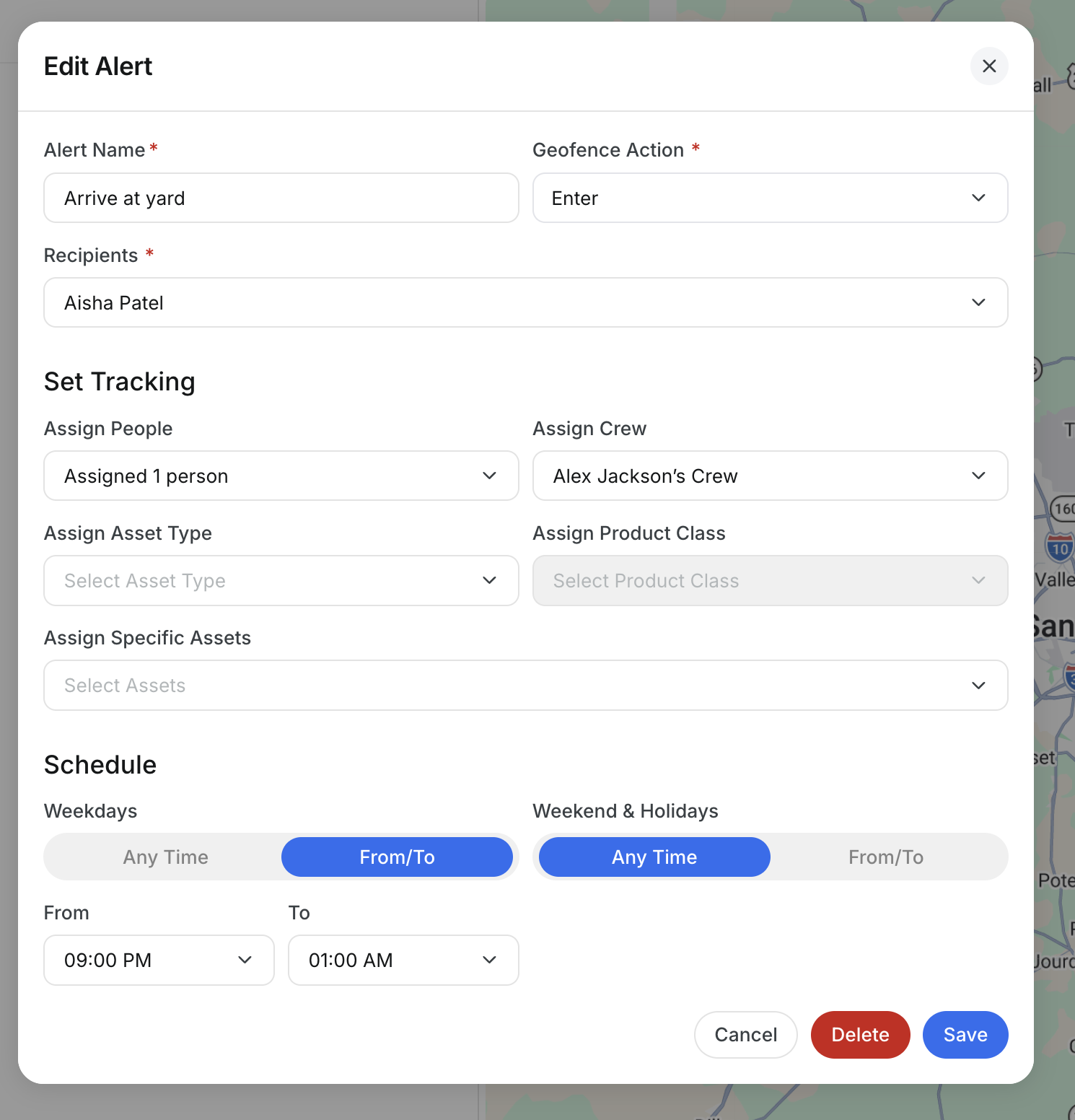
Geofence alerts can now run on a schedule, giving you control over when CLUE sends notifications. Set the days and hours when you want to receive alerts, including separate schedules for weekdays, weekends, and holidays. Outside those windows, CLUE stays quiet, helping you focus on the equipment movements that matter without unnecessary after-hours notifications.
When creating or editing a geofence alert, the new Schedule section lets you configure:
- Weekdays: Choose Any Time or set a specific From/To range.
- Weekend and Holidays: Set a separate alert window or choose Any Time.
- Overnight schedules: Set ranges such as 7:00 PM to 5:00 AM, even when the alert window crosses midnight.
Open a geofence alert, then configure the Schedule section.
Request a Demo Today to
See Our Latest Features in Action!
See Our Latest Features in Action!
Oops! Submission failed. Please try resubmitting the form.
.png)
.jpg)