



Built for the Foreman Running the Jobsite
Foremen are the boots on the ground. Clue's mobile app gives foremen the tools to manage equipment on their jobsite, flag problems, report hours, and keep work moving, all from a phone in their pocket.


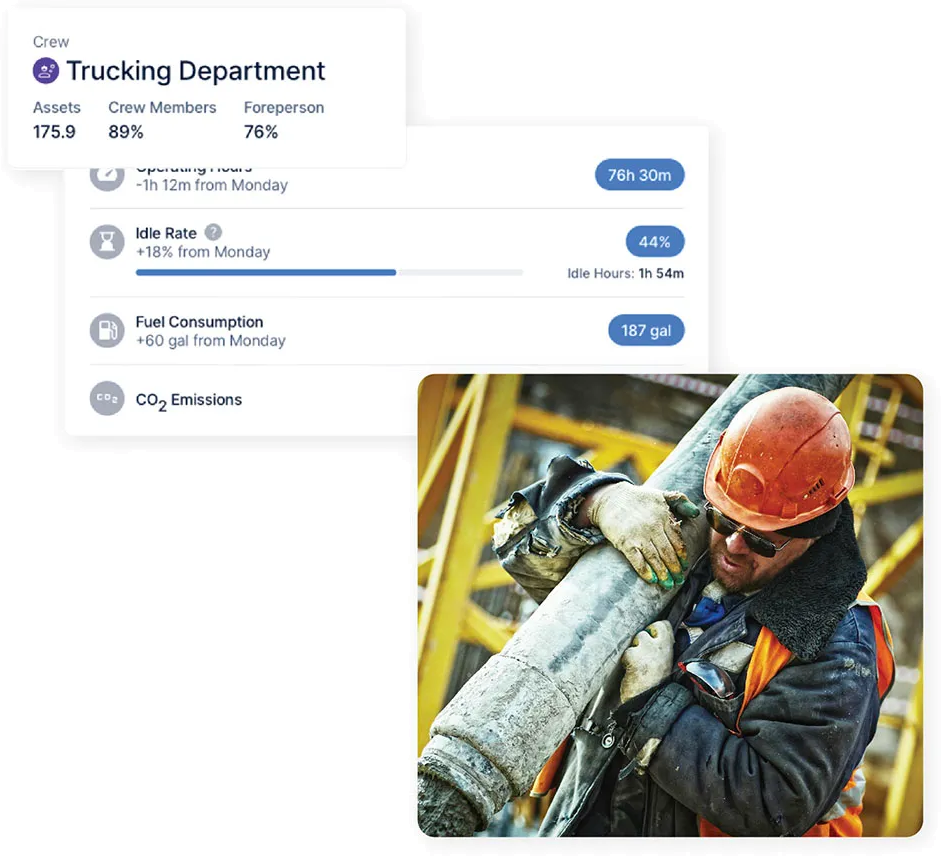





Foreman workflow
One phone for the crew. Time, requests, safety.

Crew Timecards From One Foreman Phone
A foreman enters time for the whole crew from one phone. Each worker, cost code, and set of hours goes on the same timecard.
Whole crew, one phone: Every worker on the same timecard
Coded at entry: Hours tied to cost codes in the field, not retyped later
Manager review: Timecards are approved before they reach payroll
Time saved: Earth Basics expects 40 to 50 hours saved at full rollout with the time card app

Jobsite Equipment and Crew Visibility
One jobsite view shows equipment, crews, and projects together, so a foreman can check what is on site and who is assigned without calling the yard.
What is on site: Equipment, crews, and projects in one jobsite view
Last known location: Where each asset was last seen, without calling the yard
Owned and rented: Rentals and attachments appear in the same view
Shared record: Built on Clue asset tracking that dispatch and the shop also see

Equipment Requests and Return Coordination
Field equipment requests reach dispatch with the type, count, dates, project, and dropoff point already attached.
Complete requests: Type, count, dates, project, dropoff point, and notes
Track to fulfilment: Follow each request from open to filled
Return requests: Send equipment back before idle rental days add up
Costed to the job: The project travels with the request into dispatch

Inspections That Start Follow-Up
Foremen complete DVIR, pre-trip, post-trip, or custom inspections from the field, with a pass or fail recorded on every item.
Every form type: DVIR, pre-trip, post-trip, and custom checklists
Photo evidence: Pass or fail per item with photos and a PDF report
Failures create work: A failed item becomes a work order for the shop
Stays with the asset: Each completed inspection builds the repair history
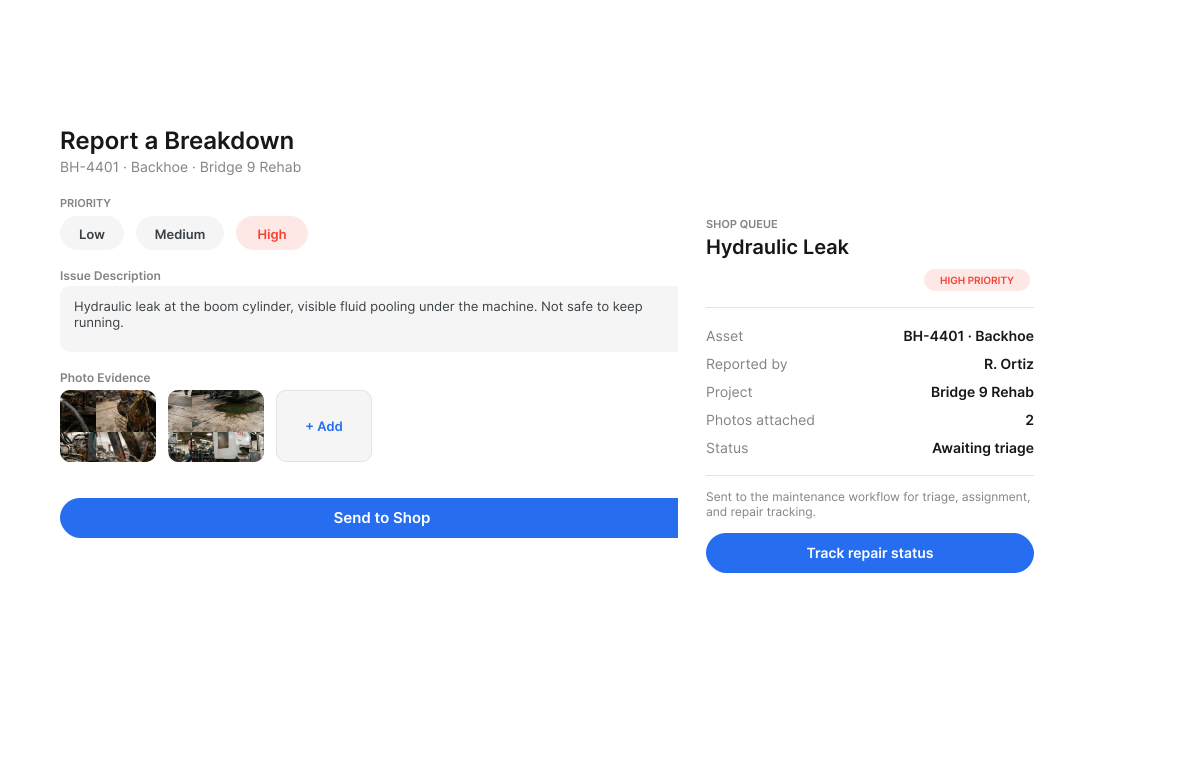
Breakdown Reports With Field Context
A breakdown report gives the shop a photo, clear notes, and priority from the field, so a mechanic arrives knowing what failed.
Photo first: Clue writes the repair description from the image
Priority from the field: The shop can tell down from due at next service
Right parts first trip: Context arrives before the mechanic does
Faster turnaround: At Earth Basics a 3 hour work order now takes 2 hours 45 minutes

Toolbox Talks and Safety Records
Foremen run toolbox talks from the jobsite, marking each crew member present with a sign-off in one place.
Run it on site: Toolbox talks delivered from the jobsite, not the office
Attendance and sign-off: Each crew member marked present in one place
Record kept: The attendance log stays attached to the talk
Safety visibility: See topic coverage by crew across sites with toolbox talk software
Built for every role
Solutions for every team.
Field, shop, and office teams use the same system. Equipment managers, fleet managers, operations leaders, CFOs, and executives see equipment details for their work.

Equipment Manager
“It's a single pane of glass where you see everything across your fleet, from the field to the phone to the computer.”
Abe Sharaf
Equipment Manager, Pulice Construction
Read Pulice’s story

Fleet Manager
“Imagine receiving 2,000 spreadsheets that needed to be approved individually in an email. There were entire teams dedicated to that. Now the system is fully automated, completely automated from beginning to end.”
Julio Lopez
Fleet Manager, Fort McKay Group
Read Fort McKay’s story

CFO
“You went from doing two services a day to six services a day. That right there is priceless to me.”
Darrin Sheriff
Director of Maintenance & Purchasing, Palmetto Corp
Read Palmetto’s story

VP of Operations
“The big thing with Clue is that we're able to bridge the gap between our field, our operators in our shop, and other departments. Everybody's bought into Clue now.”
Eric Sellman
COO, Brent Scarbrough & Co
Read Brent Scarbrough’s story

Executive
“We had 20 different logins between all our different softwares and web platforms. Now all that information pulls into one spot and we're able to see it in a single place.”
John Igel
CEO, George Igel Co.
Read Igel’s story

Operations Manager
“The operator's in control of his own destiny. That was a huge reason why not only did I buy into it, but I'm also investing into it for the future.”
Ben Benoit
Operations Manager, Onshore Companies
Read Onshore’s story
Through the foreman's day
Why Foremen Choose Clue
Manage your jobsite from your phone. No paper, no radio, no guessing. Clue replaces the end-of-shift clipboard round with one entry that reaches the office immediately.
Everything on Your Phone
No trips to the office, no radio calls, no paper forms. Manage jobsite equipment entirely from the Clue mobile app on iOS or Android.
Instant Breakdown Reporting
Photo, description, submit. Clue writes the repair description from the photo, so the shop gets usable context instead of a one-line note.
Digital Inspection Checklists
Pre-shift inspections completed and submitted digitally in minutes, with photos attached and a PDF report kept against the asset.
Hours Tracking Made Simple
Log daily equipment hours with no spreadsheets. Earth Basics is on track to save about 20 hours of payroll administration.
Operator Accountability
Digital assignment records show exactly who operated what equipment and when, alongside that machine's inspections and repairs.
Offline Capable
Clue works without signal and syncs automatically when connectivity returns, so a remote jobsite never means a paper fallback.
Connect Your Fleet Systems
Clue offers 80+ integrations for OEM telematics, GPS and aftermarket trackers, ERP, accounting, and CMMS systems. Engine hours sync from telematics. Teams add equipment by hand to the same fleet view.

















































From the people who use it every day
What contractors say
“The biggest difference has been the user friendliness.”
William A. Hazel
“The big thing with Clue is that we’re able to bridge the gap between our field, our operators in our shop, and other departments.”
Brent Scarbrough & Company
“There were entire teams dedicated to approving spreadsheets one by one.”
Fort McKay First Nation
“It exposes dead cost or overhead that maybe we don’t know about because it gets lost in those three different systems.”
Moss Utilities
“Clue’s real-time data capability has completely changed the way we manage our assets.”
Darrin Sheriff, Director of Maintenance and Purchasing
“It was probably taking the better part of a day to combine all the data from the telematics.”
Derek Wolfe, Equipment Manager, George Igel Co.
“Clue allows us to effectively control our operations: financially, effectively and safely.”
Joseph Yammine, Project Manager, Graham
“QR codes have been a game changer for us with regards to operator inspections.”
Ben Benoit, Operations Manager
“It’s a single pane of glass where you see everything across your fleet, from the field to the phone to the computer.”
Abe Sharaf, Corporate Equipment Engineer
“Our field guys were tired of having a new product, a new something to learn each time.”
Rob Judge, Sr. Procurement & Program Manager
“Our equipment is in far better shape since we started using Clue, for sure.”
Jake Farley, Equipment Manager, Silver Star Construction











Template Manager in Clue: Inspection Templates, AI Import & Shared Categories
Parts Management in Clue: Requests, Delivery Tracking & Inventory
Preventive Maintenance in Clue: Build a PM Plan, Automate Work Orders
Work Orders in Clue: Repair History, Parts, and Labor Costs
Asset Directory in Clue: Saved Views, Bulk Edits & Meters
Common questions
Construction foreman equipment app FAQ.
What can a foreman do in the Clue app?
Foremen can view equipment assigned to their jobsite, submit repair requests, run pre-shift inspection checklists, log equipment hours, and track operator assignments, all from iOS or Android. Clue Dailies lets foremen close out the day. It records the crew, equipment, materials, small tools, and production for the job, with most details filled in.
See Clue pricingHow does the repair request process work?
Foremen submit a repair request in the Clue app with a description and optional photos. The request goes to the equipment manager's queue and is assigned to a mechanic as a work order.
Can foremen complete equipment inspections on mobile?
Yes. Clue's mobile app includes configurable inspection checklists with pass/fail items and photo attachment. Completed inspections are logged and visible to the equipment manager.
How are operator assignments handled in Clue?
Equipment managers or dispatchers assign operators to equipment in Clue. Operators confirm their assignments through the app, creating a digital record the foreman can view.