



Finally, Fleet Data That Finance Can Work With
Construction CFOs must justify every equipment purchase, control fleet costs, and deliver margin. Clue gives finance leaders the asset-level data to do all three, from live numbers instead of estimates or manual field reports.


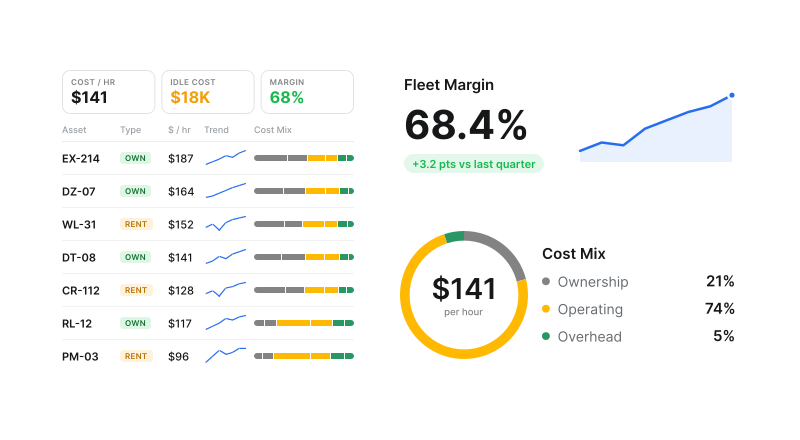




Fleet cost view
Fleet costs in one view. Rent, own, plan.

True Cost Per Hour, Per Machine
Clue aggregates repair costs, fuel, parts, and rental spend into a fully loaded cost per hour for every asset, so finance works from what a machine actually costs to run.
Fully loaded cost per hour: Repairs, fuel, parts, and rental spend combined per asset
Margin by asset: Revenue, cost, and margin reported by asset, fleet, or project
Negative margin flagged: Equipment costing more than it earns is surfaced for review
Traceable to source: Every figure links back to the work order, fuel entry, or invoice

Capital Expenditure Justification
Back every CapEx request with utilization data. A machine at 85% utilization going overdue on maintenance makes its own replacement case. One idle 40% of the time gives you grounds to question the purchase.
Utilization against target: Operating hours measured against the target for each equipment class
Repair history attached: Rising maintenance spend visible on the same asset record
Disposal candidates: Falling utilization plus rising cost flags a write-off early
Board-ready trend: A multi-year pattern rather than one year of invoices

Rental vs. Own Analysis
Clue shows the cost of owning an asset alongside rental rates for comparable machines, so the rent or buy decision rests on your own numbers rather than a vendor quote.
Own vs rent side by side: Owning cost shown against rates for comparable machines
Return dates tracked: Rental duration and return status in the same fleet view
Rental utilization: Cost compared against utilization for the same period
Charge rates: Set by type, class, or individual asset

Fleet Financials and Cost Allocation
Allocate fleet costs to projects, divisions, or cost centers in Clue, and give project managers visibility into the equipment spend they control.
Allocate to projects: Costs assigned to projects, divisions, or cost centers
Field-sourced entries: Drawn from work orders, fuel reports, and timecards
ERP sync: Cost codes flow to connected ERP systems including Vista, Sage, and Spectrum
No month-end rebuild: Allocation does not wait on a hand-built spreadsheet

Fuel Spend Tracking and Efficiency
Track fuel consumption per asset and identify the high idle-time machines where fuel turns into cost without producing output.
Fuel per asset: Fuel rate, volume, and cost by machine and period
Telematics and manual: Connected GPS and OEM telematics, plus mobile entry
Idle fuel surfaced: Idle hours and idle rate reported beside consumption
Feeds cost per hour: Fuel rolls into asset cost through fuel management

Parts and Maintenance Spend Transparency
See what you spend on parts and labor per machine and per month, and identify the assets taking a disproportionate share of the maintenance budget.
Spend per machine: Parts and labor broken out by asset and by month
Repair history: Repeat failures visible across work orders
Renewal evidence: High-maintenance assets identified for replacement
Caught early: At Palmetto Corp an oil leak found early avoided a $20,000 engine replacement
Built for every role
Solutions for every team.
Field, shop, and office teams use the same system. Equipment managers, fleet managers, operations leaders, CFOs, and executives see equipment details for their work.

Equipment Manager
“It's a single pane of glass where you see everything across your fleet, from the field to the phone to the computer.”
Abe Sharaf
Equipment Manager, Pulice Construction
Read Pulice’s story

Fleet Manager
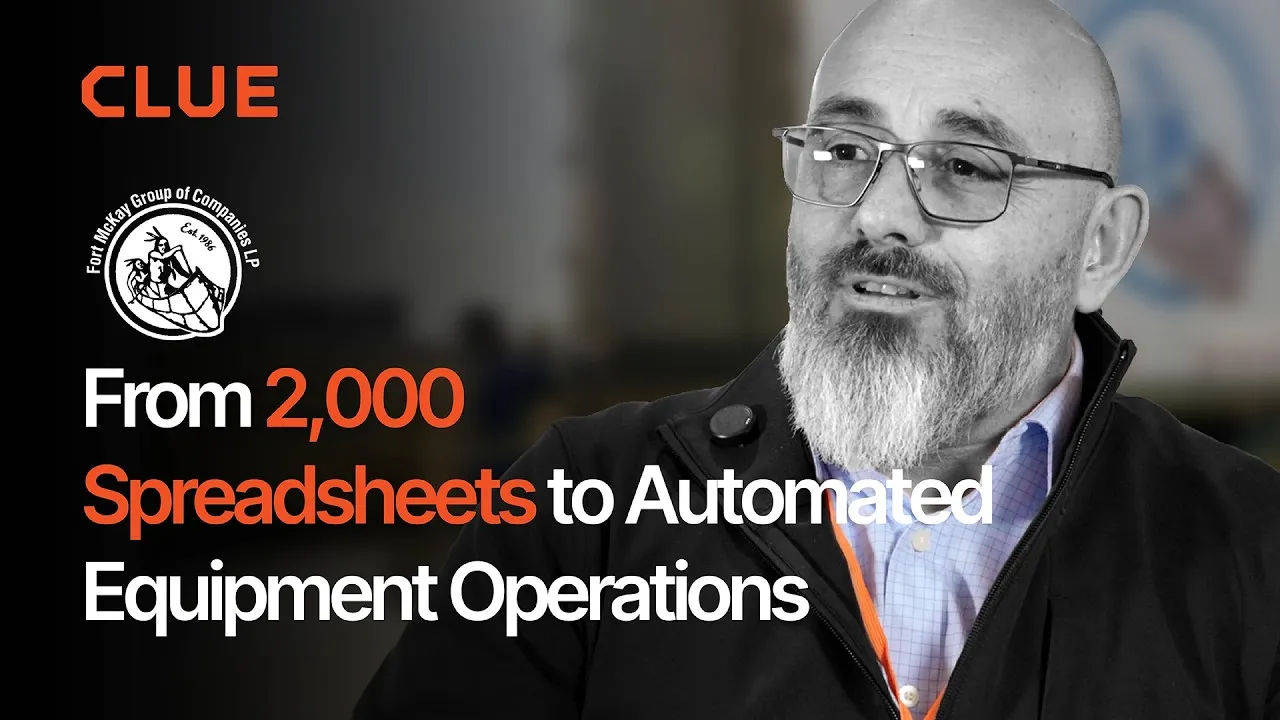
“Imagine receiving 2,000 spreadsheets that needed to be approved individually in an email. There were entire teams dedicated to that. Now the system is fully automated, completely automated from beginning to end.”
Julio Lopez
Fleet Manager, Fort McKay Group
Read Fort McKay’s story

CFO
“You went from doing two services a day to six services a day. That right there is priceless to me.”
Darrin Sheriff
Director of Maintenance & Purchasing, Palmetto Corp
Read Palmetto’s story

VP of Operations
“The big thing with Clue is that we're able to bridge the gap between our field, our operators in our shop, and other departments. Everybody's bought into Clue now.”
Eric Sellman
COO, Brent Scarbrough & Co
Read Brent Scarbrough’s story

Executive
“We had 20 different logins between all our different softwares and web platforms. Now all that information pulls into one spot and we're able to see it in a single place.”
John Igel
CEO, George Igel Co.
Read Igel’s story

Operations Manager
“The operator's in control of his own destiny. That was a huge reason why not only did I buy into it, but I'm also investing into it for the future.”
Ben Benoit
Operations Manager, Onshore Companies
Read Onshore’s story
Behind every fleet decision
Why Construction CFOs Choose Clue
Asset-level costs. Defensible CapEx. Real-time fleet financials. Clue reports cost and margin per machine and ties fleet spend to the projects that consumed it, so a budget review starts from the assets actually losing money.
Asset-Level Financial Data
Costs tie to individual machines, not a fleet line item. Revenue, cost, and margin report by asset, fleet, or project, and negative-margin equipment is flagged automatically.
Justified CapEx Requests
Operating hours sit beside repair spend and cost per hour, so a replacement case reads as a trend the board can follow rather than an opinion from the shop.
Rental Cost Control
See what is on rent, how long it has been out, and whether returns happen on time. Rentals sit in the same view as owned assets, so idle ones are just as visible.
Project Cost Allocation
Fleet costs allocate to projects from the work orders, fuel entries, and timecards already captured in the field, so managers and finance work from the same number.
Idle Time in Dollars
Telematics supplies the hours and Clue applies the rate, so idle time arrives as a reported dollar figure rather than an estimate someone defends in a meeting.
Same Team, More Insight
Clue handles collection and automated reporting, so one finance team covers more ground. Reports can be saved, scheduled, and pulled into Power BI or Tableau via the REST API.
Connect Your Fleet Systems
Clue offers 80+ integrations for OEM telematics, GPS and aftermarket trackers, ERP, accounting, and CMMS systems. Engine hours sync from telematics. Teams add equipment by hand to the same fleet view.














































From the people who use it every day
What contractors say
“It exposes dead cost or overhead that maybe we don’t know about because it gets lost in those three different systems.”
Moss Utilities
“The big thing with Clue is that we’re able to bridge the gap between our field, our operators in our shop, and other departments.”
Brent Scarbrough & Company
“There were entire teams dedicated to approving spreadsheets one by one.”
Fort McKay First Nation
“The biggest difference has been the user friendliness.”
William A. Hazel
“Clue’s real-time data capability has completely changed the way we manage our assets.”
Darrin Sheriff, Director of Maintenance and Purchasing
“It was probably taking the better part of a day to combine all the data from the telematics.”
Derek Wolfe, Equipment Manager, George Igel Co.
“Clue allows us to effectively control our operations: financially, effectively and safely.”
Joseph Yammine, Project Manager, Graham
“QR codes have been a game changer for us with regards to operator inspections.”
Ben Benoit, Operations Manager
“It’s a single pane of glass where you see everything across your fleet, from the field to the phone to the computer.”
Abe Sharaf, Corporate Equipment Engineer
“Our field guys were tired of having a new product, a new something to learn each time.”
Rob Judge, Sr. Procurement & Program Manager
“Our equipment is in far better shape since we started using Clue, for sure.”
Jake Farley, Equipment Manager, Silver Star Construction













Work Orders in Clue: Repair History, Parts, and Labor Costs
Parts Management in Clue: Requests, Delivery Tracking & Inventory
Template Manager in Clue: Inspection Templates, AI Import & Shared Categories
Preventive Maintenance in Clue: Build a PM Plan, Automate Work Orders
Asset Directory in Clue: Saved Views, Bulk Edits & Meters
Common questions
Construction fleet management software for CFOs FAQ.
What financial metrics does Clue track?
Clue tracks cost per hour, total maintenance spend, fuel costs, rental spend, parts costs, and idle time, all broken down per asset, jobsite, division, and time period.
See Clue pricingCan Clue help justify equipment purchases to the board?
Yes. Clue provides utilization rates and cost-per-hour data for every asset, making it straightforward to build the financial case for replacement, disposal, or addition.
How does Clue handle fleet cost allocation?
Clue allocates fleet costs to projects and divisions. Project managers see their equipment spend, and finance gets a rolled-up view across the organization.
Can Clue show us the ROI of switching to Clue?
Yes. Clue's team will work with you to calculate expected savings from idle time reduction, rental cost control, and maintenance optimization based on your fleet profile.
Does Clue integrate with our ERP or accounting system?
Clue offers integrations and data exports that can feed into your ERP, accounting platform, or business intelligence tools.
Can Clue show which assets are losing money?
Yes. Clue's Fleet Financials dashboard surfaces assets running negative margin in a dedicated view so CFOs can see exactly which machines are costing more than they generate and make informed disposal or replacement decisions.
Does Clue track vendor invoice accuracy?
Yes. Clue's AI Invoice Review compares uploaded vendor invoices against the work order scope and flags discrepancies automatically, giving finance teams a clear audit trail before approving payment.
Can Clue help reduce unnecessary rental spend?
Yes. Clue tracks rental return dates, sends automated reminders, and flags underutilized rental assets so finance teams can cut equipment that is sitting idle on a job site and billing daily.