What is this?
Material Billing adds up the materials your crews report on their dailies. See the quantity, the unit cost and the total cost by project, phase, vendor, material and day. Check a vendor invoice or a job cost without a spreadsheet.

Who's this for?
- Project managers, to see what materials a job used and what they cost.
- Accounting, to check material invoices against what the field reported.
- Operations managers, to compare material use across projects and phases.
How to use it
Step 1: Open Material Billing
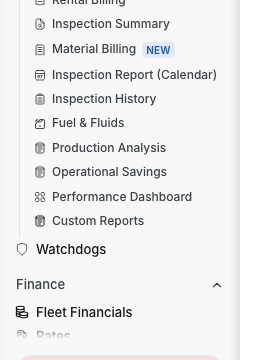
In the menu, open Reports > Material Billing.
Step 2: Pick the period and the grouping
Click the date button and pick Day, Week, Month, Year or Custom. Then click Data Structure, check the levels you want and drag them into order.
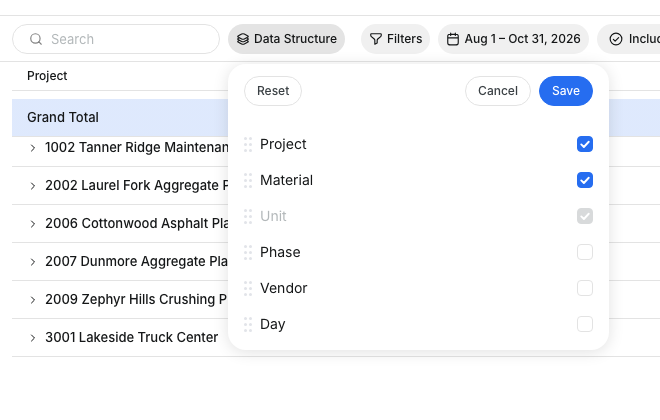
Unit is always on. You can move it, but not remove it, so tons and loads never add up together.
Step 3: Narrow it down
Click Filters to pick projects, vendors or materials. Type in Search to find a name fast.

Step 4: Add more columns
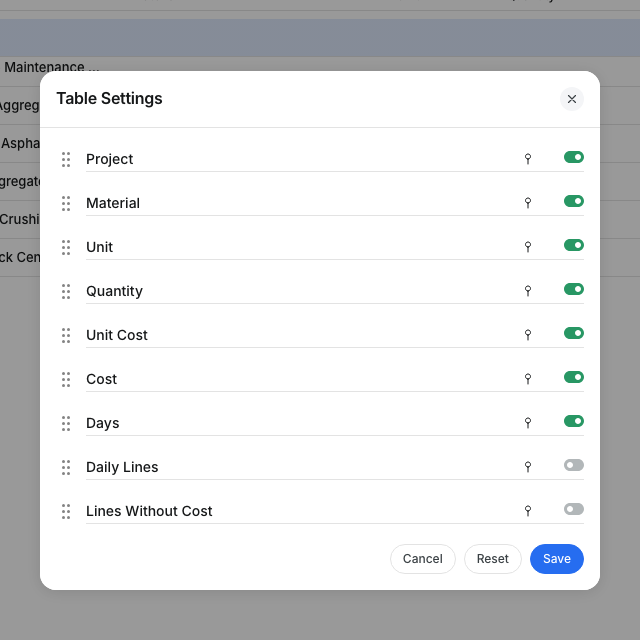
Click the Table Settings icon at the top right. Turn on Daily Lines or Lines Without Cost, then click Save.
Step 5: Download
Click the download icon and pick CSV or Excel. The file has one line for each project, phase, vendor, material, unit and day, with every column.
The full details
- Where the numbers come from: the material lines on your dailies.
- Cost: the line's total cost. When a line has no total, Clue uses quantity times unit cost.
- Unit Cost: the cost divided by the quantity of the lines that have a cost.
- Quantity: shows when all rows in a group share one unit.
- Days: the days with material lines.
- Included Dailies: pick which daily statuses count. By default every daily counts except deleted ones.
- Costs: people who can see daily costs see the cost columns. Others see quantities only.
- Projects: you see the projects your role lets you see.
- Turn it on: a company admin can turn Material Billing on or off in Company Settings > Permissions > Reports.
Tips
- Put Vendor first, then Material and Day, to check an invoice line by line.
- Turn on Lines Without Cost to find lines your crews entered without a price.
- Ask your foremen to pick the same unit for the same material. "EA" and "each" show as two units.