How Clue Merges Duplicate Assets: Matching Modes
What is this?
Most fleets see one machine from several places. A dealer telematics feed, a GPS tracker, your ERP and a rental company can each send their own record for the same excavator. Clue's de-duplication finds those records and merges them into one asset. Every report then shows the machine once, with all of its hours, locations and history.
Each data source has a matching mode. The mode decides when two records count as the same machine: by asset name, by serial number, or by either one.
Who's this for?
- Equipment managers, who want each machine to show up once in utilization and cost reports.
- Company admins, who connect data sources and choose how each one matches.
- Clue support, who set up matching for a new integration and review records two systems disagree on.
How to use it
Step 1: Open the deduplication settings
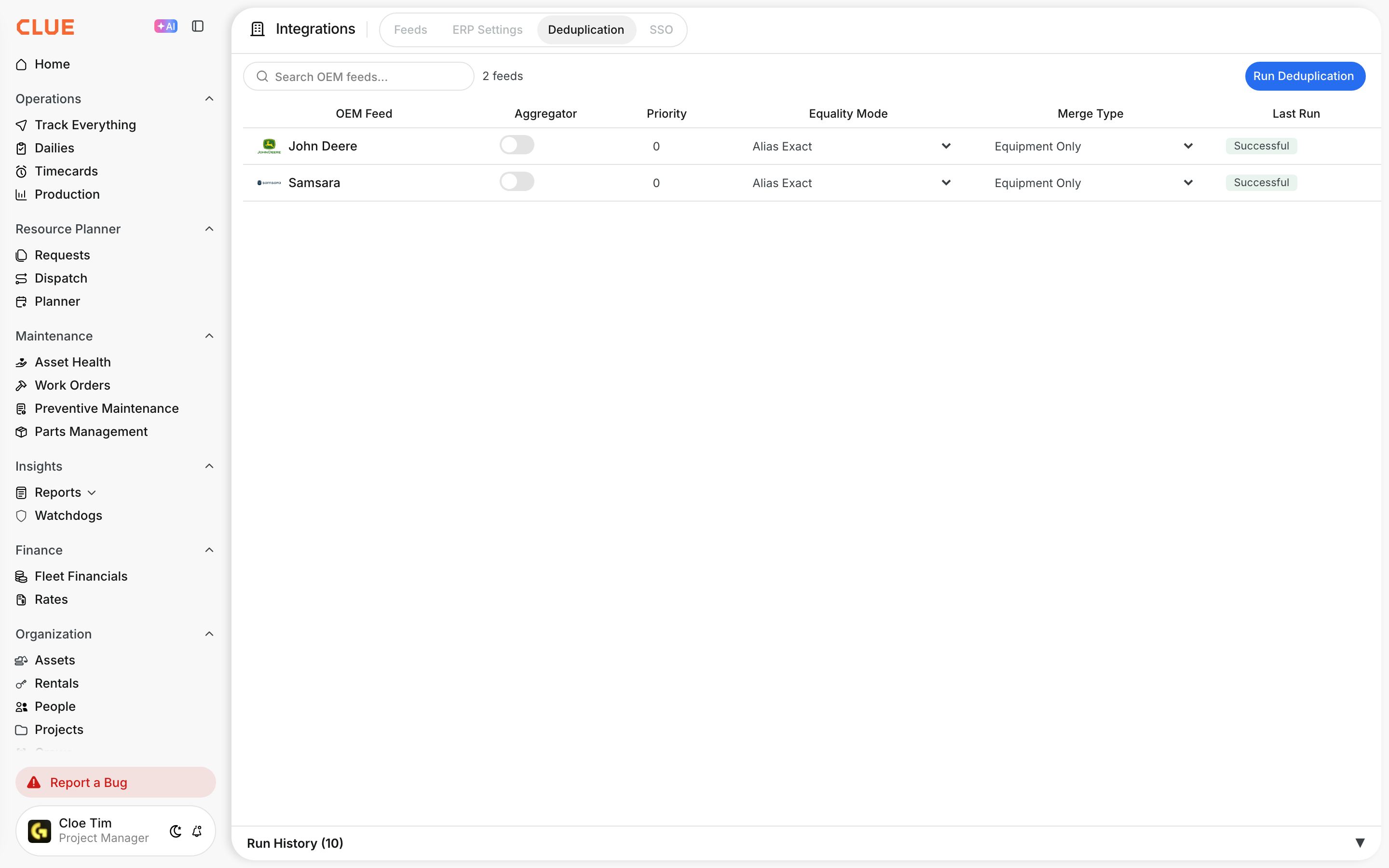
Go to Company > Integrations > Deduplication. Each row is one data source, as shown above.
Step 2: Choose the matching mode
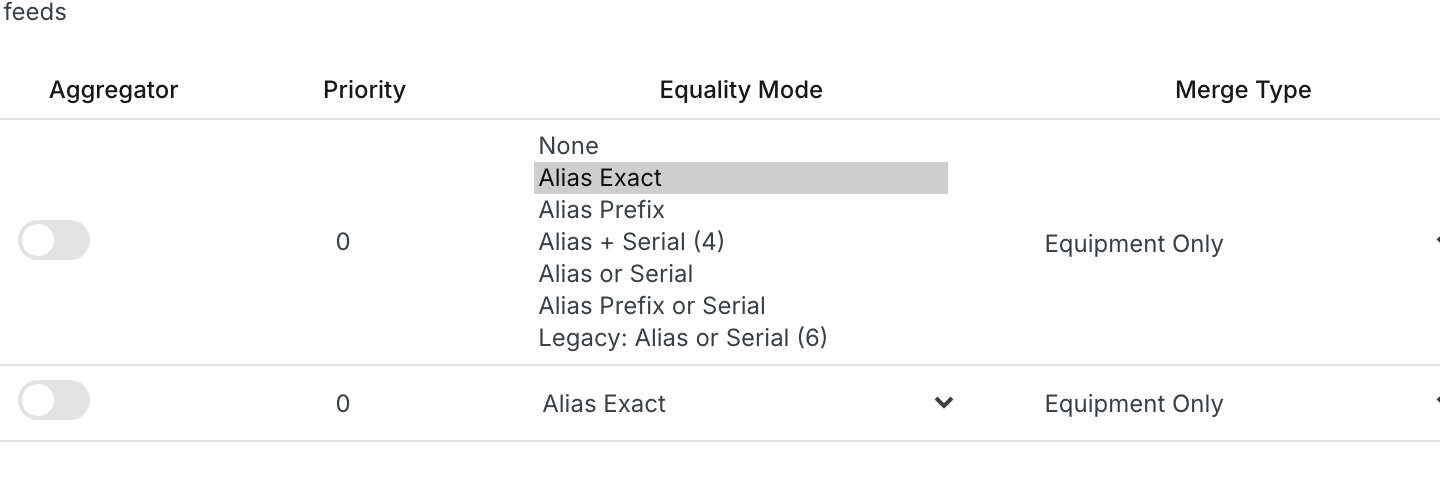
Click the source's Equality Mode and pick a mode. The next section explains each one.
Step 3: Check the result
Your choice saves right away. Clue applies it on the next de-duplication run, about once an hour. Click Run Deduplication to run it now.

The matching modes at a glance
| Mode | Name must | Serial must | Merges when | Best for |
|---|---|---|---|---|
| None | n/a | n/a | Never | Sources you never want merged |
| Alias Exact | Be identical | Not checked | Name matches | Sources that use your own equipment numbers |
| Alias Prefix | Match up to the first space, dash, colon or comma | Not checked | Name start matches | Sources that add a description after your number |
| Alias + Serial (4) | Be identical | End in the same 4 characters | Name AND serial match | Sources that reuse names across machines |
| Alias or Serial (recommended) | Be identical | Identify the same machine (strict serial rule) | Name OR serial matches | Telematics, GPS and rental feeds |
| Alias Prefix or Serial | Match up to the first space, dash, colon or comma | Identify the same machine (strict serial rule) | Name start OR serial matches | Your ERP or maintenance system, such as HCSS |
| Legacy: Alias or Serial (6) | Be identical | End in the same 6 characters | Name OR serial ending matches | Older setups only. Use Alias or Serial instead |
Each mode explained
None
This source is never merged with anything. Use it for a source whose records you always want to see on their own.
Alias Exact
Two records merge when their asset names are exactly the same, including upper and lower case.
- Merges: "EX-210" and "EX-210".
- Does not merge: "EX-210" and "ex-210", or "EX-210" and "EX-210 Excavator".
Alias Prefix
Clue compares only the start of each name, up to the first space, dash, colon or comma.
- Merges: "742445 - FORD F-150" and "742445". Both start with "742445".
- Merges: "320600: Light Tower" and "320600".
- Does not merge: "742445" and "742446".
Alias + Serial (4)
Both checks must pass: the names are identical, and the serial numbers end in the same 4 characters.
- Merges: "TRK-12" with serial "1FT7W2BT5KEC90417" and "TRK-12" with serial "C90417".
- Does not merge: two records named "TRK-12" whose serials end in "0417" and "5521". Same name, different machines.
Alias or Serial
Either check is enough: the names are identical, or the serial numbers identify the same machine under the strict serial rule below. This is the recommended mode for most sources.
- Merges by name: "029910" and "029910".
- Merges by serial: "Hitachi ZX210" with serial "HCMDAT60C00200612" and "70764" with serial "HCMDAT60C00200612".
- Does not merge: a Bobcat with serial "B4CE30220" and a Cat 335 with serial "0008-0XBE30220". They only share the last 6 characters.
Alias Prefix or Serial
Either check is enough: the names match up to the first space, dash, colon or comma, or the serial numbers identify the same machine under the strict serial rule. Use it for an ERP or maintenance system whose codes carry a description.
- Merges by name: "742445 - FORD F-150" and "742445".
- Merges by serial: HCSS code "029919" and telematics record "70764", both with serial "HCMDAT60C00200612".
Legacy: Alias or Serial (6)
The names are identical, or the serial numbers end in the same 6 characters. It is kept so older setups keep working. It can merge two different machines whose serials happen to end the same way, so choose Alias or Serial instead.
The strict serial rule
Alias or Serial and Alias Prefix or Serial compare serial numbers in these steps. Two records merge on the serial only when every step passes.
| Step | What Clue does | Example |
|---|---|---|
| 1. Clean up | Ignores upper and lower case, spaces, dashes and dots, a leading "S/N", "SN", "SER" or "Serial" label, and leading zeros. | "S/N 0D2W-00426" equals "D2W00426" |
| 2. Skip unusable serials | A serial never matches when it is shorter than 6 characters, is a placeholder, or is on your company's excluded serials list. | TBD, TBA, UNKNOWN, VARIOUS, N/A, NONE, OTHER, HOLD FOR..., PLEASE ENTER..., 000000, XXXXXX, 123456, AAAAAA |
| 3. Same serial | Serials that are equal after clean-up match. | "29d-244-2690" equals "29D2442690" |
| 4. Dealer prefixes | One serial may end with the other when the shared part is at least 7 characters. | "0008-3T900357" matches "3T900357" |
| 5. Short endings | A shared ending of exactly 6 characters only counts when both records have the same make. | Hitachi "C66261" matches Hitachi "BANNEM60H85C66261" |
| 6. Look-alikes | Two longer serials that only share their last characters never match. | "513268UHAHH88" and "513109UHAHH88" stay separate |
| 7. Only one match | The serial must point to exactly one other active asset. If two or more match, Clue does not merge on the serial. Deactivated assets do not count. | Three active records with one serial stay separate |
| 8. Typed-in sources | For an ERP, a maintenance system, or assets created by hand in Clue, the serial match is skipped when the match is in the same source, or when that source holds the serial on another code. | HCSS "029916" and "029859" with one serial stay separate |
| 9. Component sets | In a typed-in source, codes whose serials extend this one (such as attachments of one crane) stay separate. | "270053A" to "270053D" stay separate |
Edge cases Clue handles
| Situation | What Clue does |
|---|---|
| Name shorter than 4 characters | Never matches by name. Your company's minimum can be changed by Clue support. |
| Name on your excluded names list | Never matches by name, in any case. |
| Names that differ only in case | Do not match by name ("Tt-65" and "TT-65"). They can still match by serial. |
| Serial with junk at the end | Clue support can set characters to drop from the end before comparing, such as a trailing dot. |
| Same machine twice in one source | The oldest active record stays as the main asset. |
| Same machine in two sources | The record from the source with the lower Priority number stays as the main asset. If several qualify, the one with the lowest Priority wins, then the oldest. |
| Two sources with the same Priority number | Their records never merge with each other. Give each source its own number. |
| Deactivated records | Can merge into an active asset, but never become the main asset. |
| Deleted records | Are ignored. |
| Records already merged | Are not merged again. |
| Many records match one asset | At most 5 records merge into one main asset. If 5 or more records match each other, they do not merge at all, because that is almost always a naming pattern or a shared placeholder, not one machine. |
| Two rentals of the same machine | With rental protection on, rentals with a different PO or dates that do not overlap stay separate. Same PO and overlapping dates merge. |
| A live rental on the record being merged | With rental protection on, it moves to the main asset, which stays marked as rented. Only one live rental can move onto a main asset per run; others wait for the next run. |
| Assets created by hand in Clue | Count as their own source ("Manual"), and as typed-in for the serial rule. Clue support can make hand-made assets of a chosen source count with that source instead. |
| A source sends the same record again | A re-sent copy with the same name, already merged into the same asset, does not block the serial match. |
| You change a source's mode | Applies from the next run. Existing merges stay as they are. |
| A merge no longer fits | If your company has merge clean-up turned on, Clue re-checks each merge with the mode that made it. A merge is undone when it no longer matches under that mode. For the strict serial modes it is undone only when the two serials clearly disagree, never just because a serial is blank. A merge into a returned rental moves to the matching active asset. Merges done by hand are never undone. |
What moves when records merge
| Merge Type | What moves onto the main asset |
|---|---|
| Equipment Only | Nothing moves. The duplicate is hidden behind the main asset. |
| User Generated | Work orders, inspections and other records people created. |
| Equipment & Location | Location history. |
| All Data | Everything, including hours, locations, trackers and history. |
Rental records always move with the merge, whatever the merge type.
The full details
- Works on: Web app.
- Permission needed: changing a mode needs the integrations settings permission.
- Aggregator: only sources switched on as aggregators look for duplicates.
- Priority: lower numbers win. Give your most trusted source the lowest number.
- Run History: the bottom of the page lists each run and its result.
Tips
- Start every new telematics, GPS or rental feed on Alias or Serial.
- Keep serial numbers clean in your ERP. A serial copied from another machine is the most common reason two assets look like one.
- If two of your own codes share a serial, Clue leaves both. Fix the serial in your system, or ask support to merge them.
- Seeing a machine twice? Compare both serials first. A missing serial or a typo in the middle is the usual cause.