Inspection Summary Report
The Inspection Summary report gives you a fast, high level view of how your inspection program is doing. It shows how many inspections passed, how many reported an issue, and how many were missed. You can break the numbers down by subsidiary and division to see where inspections are being skipped.
What is this?
Inspection Summary rolls up all inspection activity into one dashboard. Instead of reading every inspection line by line, you see totals: passed, reported issues, and missing inspections, with a completion rate for each part of your company.
Who's this for?
- Equipment managers, track inspection completion across the fleet.
- Safety leads, find divisions with low completion and follow up.
- Operations, prove inspections are being done and spot gaps early.
How to use it
Step 1: Open the report
In the main menu, open Reports, then click Inspection Summary.
Step 2: Read the summary
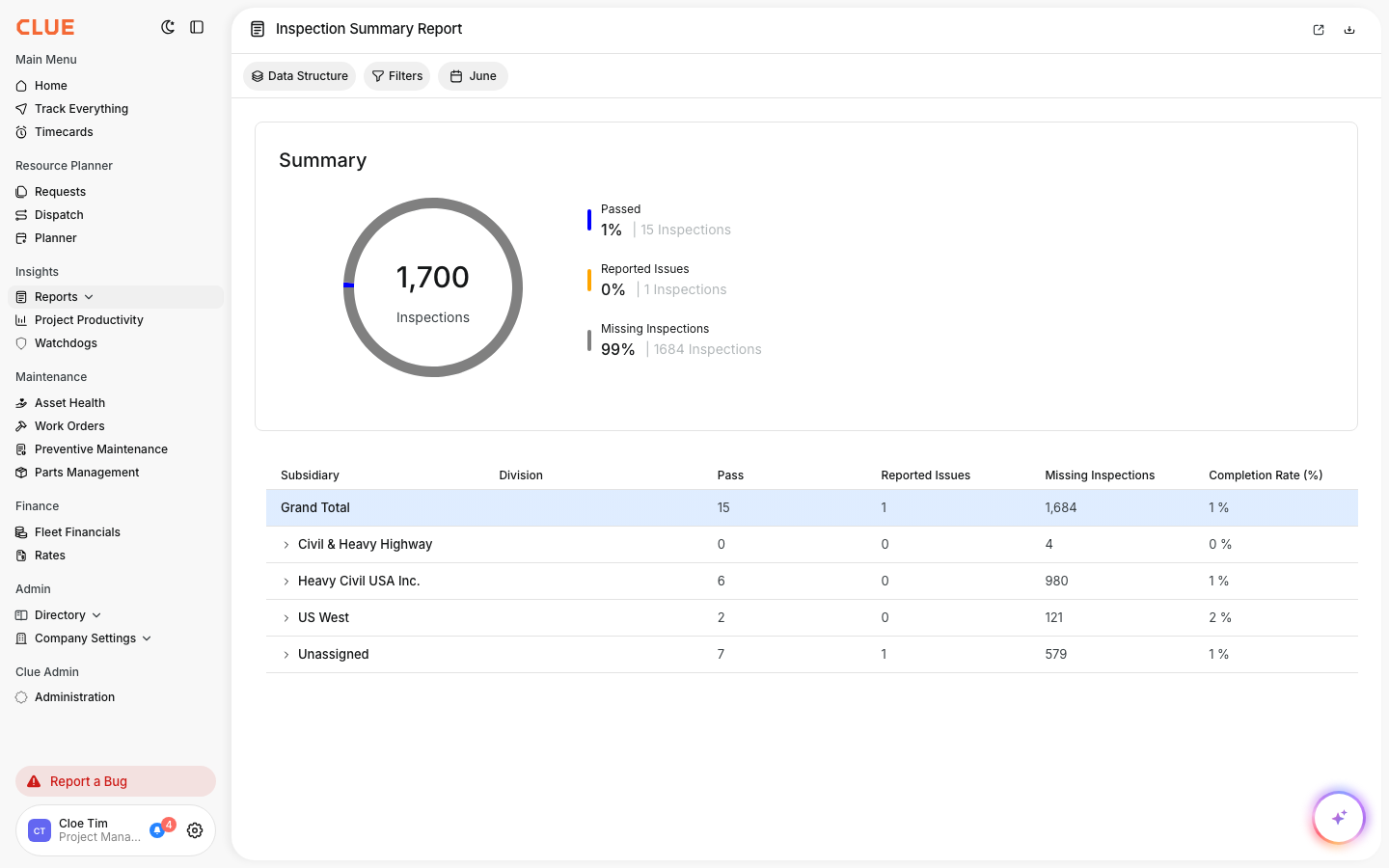
The top card shows total inspections with the split of passed, reported issues, and missing. Use the date button to change the period.
Step 3: Break it down
The table below breaks the numbers down by subsidiary and division. Expand a row to see the completion rate for that group.
The full details
- Works on: Web app
- Where to find it: Reports > Inspection Summary
- Visibility: This report shows in your menu only if your company has it enabled.
Tips
- Watch the missing inspections number, a high count means inspections are being skipped.
- Sort by completion rate to find the divisions that need a nudge.