15 Benefits of ERP Integration in Construction


Hi, I’m Maham Ali. I write about construction equipment management, helping teams use fleet data and maintenance intelligence to improve uptime, control costs, and run smoother jobsites.
A contractor rarely feels the cost of disconnected software as one big event. It arrives in pieces. A timecard keyed once in the field and again in accounting. An excavator's hours charged to the wrong job because the telematics feed never reached the ERP. A cost report that lands three weeks after the pour, when the margin is already spent.
A 2021 autodesk and FMI study estimated that bad data, meaning data that is inaccurate, incomplete, inaccessible, inconsistent, or too late to act on, cost the global construction industry about $1.85 trillion in 2020, including $88.69 billion in rework alone. ERP integration in construction is how contractors stop feeding that number.
This guide covers 15 benefits of ERP integration in construction, with a focus on equipment-heavy contractors where field data, equipment hours, maintenance, timecards, and job costs have the biggest impact on margin.
What Does ERP Integration in Construction Actually Mean?

ERP integration connects the systems a contractor already runs, including accounting, project management, payroll, equipment tracking, and field apps, so data moves between them automatically instead of being exported to a spreadsheet and retyped. The systems share one set of records rather than each keeping its own version.
In a construction business, ERP integration can touch many workflows, including job costing, payroll, project accounting, purchase orders, committed costs, billing, and reporting. For equipment-heavy contractors, the biggest gains usually come from connecting field and fleet activity to those financial records, so equipment hours, repairs, inspections, timecards, and cost codes land where the office needs them.
In an equipment-heavy operation, that looks like a few specific things:
- Engine hours and usage captured in the field post to the right job cost codes in the ERP.
- A timecard entered once on a phone exports to payroll in the exact format the ERP expects.
- A failed inspection item opens a maintenance work order without anyone re-entering it.
- Preventive maintenance triggers on real engine hours instead of a date on a calendar.
The difference is not cosmetic. Without integration, the accounting system is a record of what happened last month. With it, the same system becomes a live picture of what is happening on every job today, which is the difference between reacting to a loss and preventing one.
For contractors that already rely on accounting and maintenance systems, ERP and CMMS integrations help keep job costing, equipment records, maintenance activity, and field data aligned without forcing the office to rebuild the same information by hand.
Why Do Disconnected Systems Quietly Drain Margin?
Disconnected systems drain margin because the losses are small, constant, and rarely tied back to their cause. No one signs off on a $200,000 mistake. They approve a hundred small ones: an hour of rekeying here, a misallocated cost there, a bid built on last year's guesswork.
The macro numbers explain why this matters so much in construction specifically. When margins are already thin, the administrative drag from disconnected tools is not a nuisance. It is the gap between a profitable quarter and a flat one.
Most contractors recognize the day-to-day symptoms:
- The same hours get entered twice, once in the field and once in accounting.
- Cost reports arrive weeks after the work, when it is too late to correct course.
- Equipment usage and repair costs never reach the right job, so job costing is wrong before anyone reads it.
- Back-office staff burn days reconciling fuel, parts, and labor by hand.
- Forecasts and bids run on stale numbers, so the next job inherits the last job's blind spots.
None of these are management failures. They are what happens when a project-based business runs on tools that were never built to talk to each other. Integration is how you close the gap.
15 Benefits of ERP Integration in Construction Equipment Operations

ERP integration is not one benefit. It is a chain reaction across cost capture, payroll, billing, equipment utilization, maintenance, reporting, and closeout. The value comes from removing the manual handoffs between field activity and financial records.
The benefits below follow that chain from the first data capture point in the field to the final numbers used by accounting, project managers, fleet teams, and leadership.
1. One System of Record Across Field and Office
Most contractors do not run one system. Estimating sits in one tool, project management in another, fleet data in another, and accounting in the ERP. Field data often arrives later by spreadsheet, paper, or email. Every handoff creates another reconciliation point.
Integration gives the business one validated flow for committed cost, actual cost, equipment usage, labor hours, change orders, and approvals. The estimator pulling historical unit costs and the controller closing the month no longer start from conflicting numbers. They read from the same operating record.
2. Real-Time Job Costing Instead of Month-End Surprises
Job costing only protects margin when it is current. When field, fleet, and accounting share data, labor, equipment, materials, and subcontractor costs post against the right cost code as the work happens. Actuals move against budget before the job is already underwater.
Think of a dozer running 45 hours on a mass-grading phase. If those hours and the fuel behind them do not hit the ERP until close, the overrun appears three weeks after the dirt moved. With meter data feeding job cost directly, the same problem surfaces on day two, while there is still a crew plan or equipment assignment to change.
3. Less Duplicate Entry and Fewer Reconciliation Loops
Duplicate entry is a control problem as much as an admin problem. Every time a timecard, work order, or meter reading is typed a second time, two systems can disagree. Then the office has to decide which record is true.
This is where a construction time card app matters. Field hours can move into payroll and ERP workflows in the format downstream systems expect, helping the office process approved time without rebuilding files manually.

4. Accurate Equipment Cost Allocation and Recovery
Equipment is one of the largest cost lines on a job and one of the easiest to post incorrectly. If an excavator splits a week across two projects and all its hours land on one phase, both jobs are wrong. One carries a cost it did not use. The other looks healthier than it is.
Integrated equipment data ties engine hours, fuel, labor, parts, and repairs to the correct job, phase, and cost code. Cost codes can be carried through the work order process, then mapped into the correct ERP structure. That keeps equipment recovery tied to actual use, not a late estimate.
5. Faster Billing, Payroll, and AP Cycles
Billing speed affects cash flow. Every day between work performed and a pay application submitted is a day the contractor finances the job. When field hours, equipment cost, and approved work flow into accounting, billing and payroll run on current records instead of a reconstruction effort.
This is especially useful for time-and-material and cost-plus work, where every backup line needs to trace to a real labor or equipment record. When the cost code, asset, employee, and approval trail already exist, invoices face fewer disputes and payroll closes with fewer exceptions.
The same integration logic applies to purchase orders, AP approvals, committed costs, and parts activity. When backup documents and approvals connect to the ERP, finance can close faster without chasing missing context from the field, shop, or yard.
6. Sharper Bidding and Cost Forecasting
Estimating accuracy depends on the cost history behind it. Integrated job costing builds a cleaner record of unit costs, production rates, downtime, repair burden, and equipment usage by phase. That history gives estimators a better base than memory or last year's spreadsheet.
For the equipment line, the technical number is true cost per operating hour: ownership cost plus operating cost divided by real metered production. Once that figure comes from actual utilization and repair history, bids stop treating equipment as a round-number allowance.
7. Stronger Cash Flow Management
Construction cash flow is a timing problem. Contractors fund payroll, subcontractors, rentals, fuel, parts, and suppliers while waiting on owner payment and retainage release. Cash forecasting only works when billings, committed costs, receivables, and field actuals are current.
Integrated ERP data lets finance see cash-positive and cash-negative windows earlier. Leadership can plan credit-line use, billing timing, retainage expectations, and project starts from a live view rather than a monthly snapshot that is already stale.
The finance team also gets cleaner WIP reporting, general ledger updates, and committed-cost visibility because field activity is tied to the same cost structure used for accounting.
8. Visibility Into True Equipment Profitability
Most fleet managers can quote what an asset costs. Fewer can quote what it earns. Ownership cost, depreciation, insurance, financing, preventive maintenance, and repairs accrue whether equipment is working or parked. Without revenue or internal charge rates connected to utilization, asset profitability is mostly guesswork.
When utilization, cost, and billing rates connect, contribution margin becomes visible by asset, fleet, and project. Equipment Economics is built around that problem: revenue, cost, and profitability by asset, with visibility into which units earn their keep and which run negative margin.
9. Smarter Resource and Fleet Planning
Labor and equipment are two cost lines a contractor can move week to week. Connected data shows equipment location, utilization, status, and availability in one view, so dispatch can move an owned idle asset before approving a rental for the same class.
The catch is coverage. Plenty of mixed fleets still include assets with no telematics device. Construction equipment tracking software can report on tracked and untracked assets together, which matters when a planner needs a complete equipment picture instead of a map that only shows half the fleet.

10. Proactive Maintenance and Less Downtime
Calendar maintenance does not match how heavy equipment wears. Equipment wears based on hours, idle time, duty cycle, environment, fault codes, inspections, and operator use. ERP integration is strongest when those signals can trigger maintenance work and cost posting without a separate manual process.
Across asset-heavy industries, Deloitte has reported that predictive maintenance can increase equipment uptime and availability by 10 to 20 percent while reducing maintenance costs by 5 to 10 percent. The practical workflow behind that is straightforward: preventive maintenance tied to meter readings, failed inspection items converted into work order tasks, and maintenance history tied back to the asset.
The ERP value is not just creating the maintenance task. It is posting labor, parts, downtime, and repair costs back to the right job, asset, and financial record.
11. Cleaner Data and a Real Audit Trail
Every manual handoff is a data-integrity risk. A meter reading copied from a notebook, a cost code selected from memory, or a timecard rekeyed in the office can create a discrepancy that appears later as a variance nobody can explain.
Validation and traceability matter as much as capture. When work order changes, time entries, inspection records, and cost codes are logged in one workflow, corrections take minutes instead of a forensic search across email, spreadsheets, and job folders.
12. Stronger Compliance and Audit Readiness
Construction documentation is heavy by nature: certified payroll, inspection records, service history, DOT files, safety forms, owner backup, lien waivers, insurance certificates, and subcontractor documentation. When those records sit in separate systems, an audit or payment dispute turns into a scramble.
Integrated records keep the trail attached to the job, asset, work order, and approval. With connected equipment maintenance software, maintenance and inspection history can be pulled from an actual system record instead of reconstructed after the fact.
This is especially useful when audits involve RFIs, submittals, insurance certificates, lien waivers, inspection records, and change order backup.
13. Better Field-to-Office Collaboration

Coordination breaks down when the field and office work from different copies of the truth. A shared record lets a superintendent see maintenance scheduled against equipment on the job, lets dispatch approve a field equipment request in a workflow, and lets finance see the cost impact without waiting for a spreadsheet.
For example, a superintendent can request equipment, the equipment team can confirm availability, the shop can flag maintenance conflicts, and accounting can see the cost code trail. That is the practical value of integration: fewer status calls, fewer missing details, and fewer decisions made from stale information.
14. Portfolio-Level Decision-Making
A fleet and a portfolio of active jobs generate more data than any spreadsheet can carry cleanly. Integration standardizes the source records, which gives leadership better evidence for fleet size, rental strategy, internal charge rates, replacement timing, and which project types are worth chasing.
Repair-versus-replace is the cleanest example. An asset whose repair cost, downtime, and missed availability keep climbing is a replacement candidate. The crossover point becomes visible only when maintenance cost, downtime history, utilization, and revenue sit in the same data model.
15. Scale Without Rebuilding the Tech Stack
Point solutions scale poorly when every new division, region, or entity needs another connector. At some point the interfaces become harder to manage than the work itself.
A construction-specific field-to-ERP layer reduces that tax. Multi-level organization structures, role-based access, single sign-on, and API workflows make it easier to add a new business unit or region without rebuilding how equipment, timecard, and maintenance data move.
How Clue Connects Equipment Operations to Your ERP
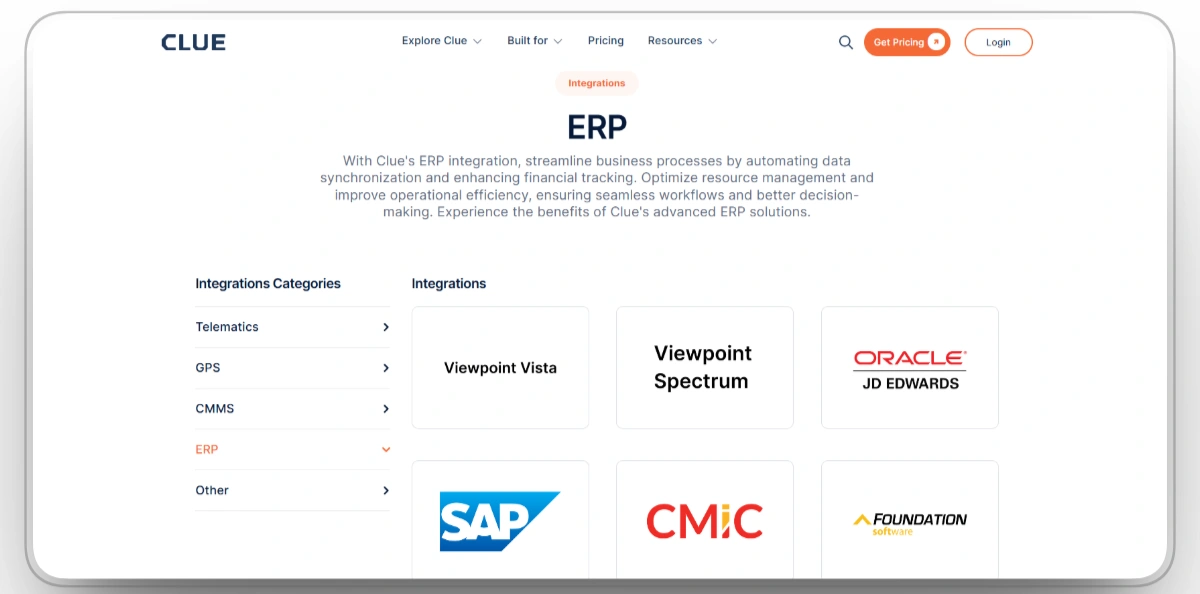
Clue is construction equipment management software that connects field, fleet, maintenance, timecard, and utilization data with the ERP and accounting systems your office already uses.
It does not replace your ERP. The ERP remains the financial system of record. Clue acts as the field and equipment operations layer that gives the ERP cleaner, more current data from jobsites, shops, yards, and equipment teams.
Clue supports construction ERP, accounting, payroll, and maintenance workflows with systems such as Viewpoint Vista, Spectrum, HCSS, and other ERP or CMMS tools. Exact workflows depend on each contractor’s setup, but the goal is the same: reduce rekeying, improve cost visibility, and keep field and finance teams working from the same numbers. Using Viewpoint? Read how integrating Vista ERP with equipment management software lifts efficiency.
Instead of exporting, reshaping, and re-entering field data, teams can move equipment hours, work orders, inspection records, timecards, and utilization data through a more connected workflow.
What Are the Common ERP Integration Pitfalls, and How Do You Avoid Them?

ERP integration projects fail more often from planning than from technology. The same few patterns show up across most contractors, and each has a straightforward fix.
Mismatched data structures
If the cost code, phase, and project structure in your field tool does not match the ERP, data lands in the wrong place and someone spends the next month cleaning it up. Map the structures before you connect anything.
Treating it as an IT project
Integration is an operations decision that happens to involve software. If finance and the field are not in the room, you will build something accounting does not use or that crews refuse to adopt. Put the people who live in the data in charge of how it flows.
Big-bang rollouts
Switching everything on at once leaves no room to catch problems before they multiply. Phase it, validate each step against real jobs, then expand. The contractors who struggle most are usually the ones who tried to do it all in one weekend.
Generic connectors and poor implementation
A tool that does not understand construction cost coding, retainage, mixed fleets, work orders, or parts workflows forces you to work around it forever. The failure is rarely the feature list. It is an implementation done by someone who did not understand how contractors actually run jobs, which is why a guided, construction-specific rollout matters more than any single integration checkbox.
Also check how the integration handles sync frequency, duplicate records, error logs, permissions, and field mapping. A connector that works in a demo can still create cleanup work if it cannot handle real job volume.
The Takeaway
Construction firms rarely lose margin to one big failure. They lose it to small disconnects: hours entered twice, equipment costs that never reach the job, reports that arrive too late to matter. ERP integration closes those gaps by making the systems you already own work as one, and the industry data on bad data shows how large those small gaps become at scale.
For equipment-heavy contractors, the opportunity is bigger than cleaner books. It is the difference between guessing what your fleet costs and knowing what it earns. Clue helps close that gap by connecting equipment operations, timecards, maintenance, utilization, inventory, and ERP data in one field-to-office workflow.
FAQs
What is ERP integration in construction?
ERP integration in construction connects accounting, project management, payroll, equipment tracking, maintenance, and field systems so data moves automatically between them. Instead of entering the same information in several places, contractors can capture data once and use it across job costing, payroll, billing, reporting, and equipment operations.
Why is ERP integration important for construction companies?
ERP integration is important because construction costs move quickly across jobs, crews, equipment, materials, and subcontractors. When systems are disconnected, cost reports arrive late, hours get entered twice, and equipment costs can hit the wrong job. Integration gives teams a cleaner, faster view of cost and performance.
How does ERP integration improve job costing?
ERP integration improves job costing by tying labor, equipment, fuel, materials, parts, and repair costs to the correct job and cost code as the work happens. That gives project managers a current view of budget versus actuals while there is still time to adjust the plan.
What construction data should connect to an ERP?
The most useful construction data to connect to an ERP includes timecards, labor hours, equipment hours, fuel, repairs, parts, inspections, work orders, cost codes, purchase orders, committed costs, billing backup, and job status. Equipment-heavy contractors should prioritize the data that directly affects job cost and fleet profitability.
Does Clue replace my ERP?
No. Clue does not replace the ERP. It acts as an equipment and field operations layer that feeds accurate field data into the ERP. The ERP remains the financial system of record, while Clue helps capture equipment, timecard, maintenance, inspection, utilization, and work order data closer to where the work happens.
What ERP and accounting systems does Clue connect to?
Clue supports major construction ERP and accounting workflows, including Vista and Viewpoint, Sage via Construct, Spectrum, and the HeavyJob to ADP chain. It also supports API workflows for contractors that need custom data movement between field, equipment, maintenance, payroll, and accounting systems.
How does ERP integration reduce double data entry?
ERP integration reduces double data entry by routing approved field data directly into the systems that need it. A timecard entered once can move toward payroll, a failed inspection can become a work order task, and equipment hours can support job costing without someone retyping the same information in the office.
Is ERP integration only worth it for large contractors?
No. ERP integration can help small and mid-sized contractors too, especially when limited back-office staff are stuck rekeying hours, reconciling equipment costs, or chasing missing job data. The value depends less on company size and more on how much time and margin is lost to disconnected systems.
What is the most common reason ERP integration fails?
The most common reason ERP integration fails is poor planning. Mismatched cost codes, unclear ownership, weak field adoption, and rushed rollouts create bad data movement. Contractors should map the cost structure first, involve finance and operations, test with real jobs, and expand the integration in phases.
Transform Your Equipment Management