New at CLUE: Store Purchase Paperwork with Each Asset, Privately
Efficiency and Cost Management
October 2, 2026


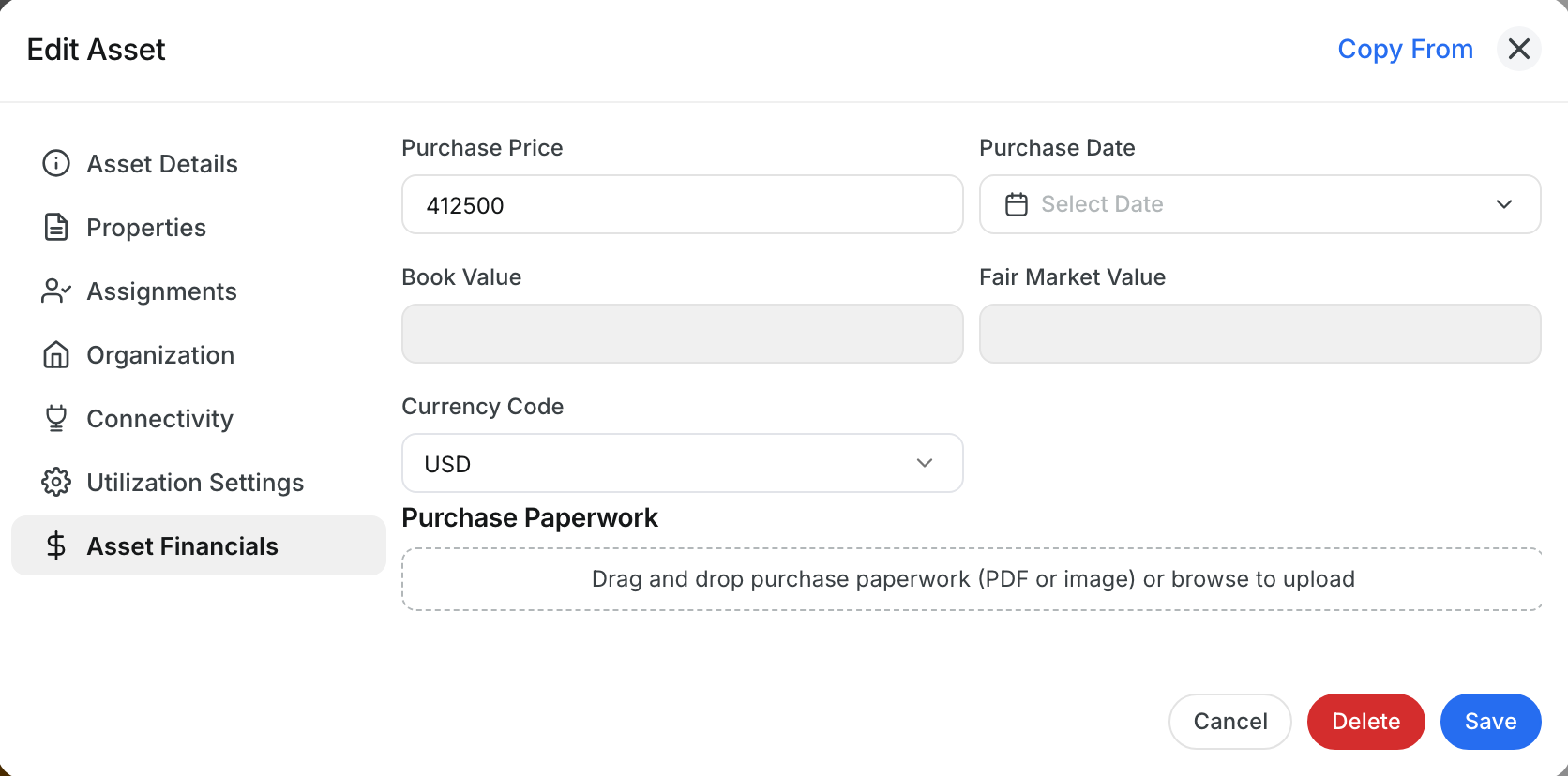
Keep a machine’s purchase paperwork right next to what you paid for it. When you edit an asset, the Asset Financials section now has a Purchase Paperwork area where you can store invoices, bills of sale and purchase agreements.
What’s New?
- Drag in purchase documents as PDFs or images
- Keep paperwork with the asset’s purchase price and date
- Only people allowed to see purchase costs, usually Admins and Managers, can see these documents and the purchase price
Go to Asset Directory, open an asset, click Edit Asset, choose Asset Financials and drop your files into Purchase Paperwork.
Request a Demo Today to
See Our Latest Features in Action!
See Our Latest Features in Action!
Oops! Submission failed. Please try resubmitting the form.