New at CLUE: Filter the Asset Directory Right from Any Column
Efficiency and Cost Management
October 2, 2026


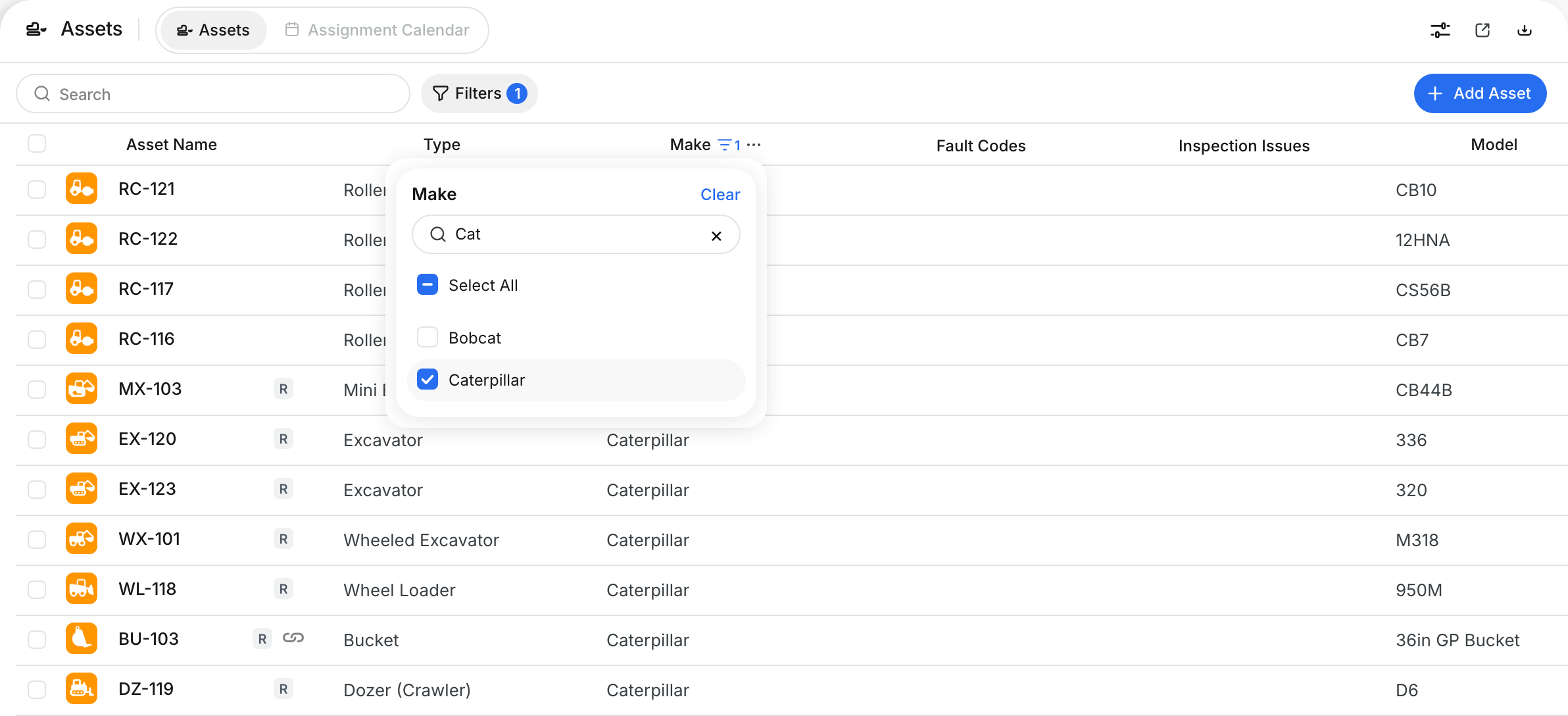
You can now filter the Asset Directory straight from the column you’re looking at. Click the … menu on any column header to open that column’s filter, then pick from its values, type a search, or set a number or date range, without opening the full filter panel.
What’s New?
- Filter from any column header in the Asset Directory
- Pick values, search within a column, or set a number or date range
- Add the equipment properties your company uses as columns, include them in downloads, and filter by them like any other field
Go to Assets > Asset Directory, hover a column header and click the … menu to open its filter. To add an equipment property as a column, open Table Settings.
Request a Demo Today to
See Our Latest Features in Action!
See Our Latest Features in Action!
Oops! Submission failed. Please try resubmitting the form.