New at CLUE: Create Draft Invoices for Several Projects at Once
Efficiency and Cost Management
October 2, 2026


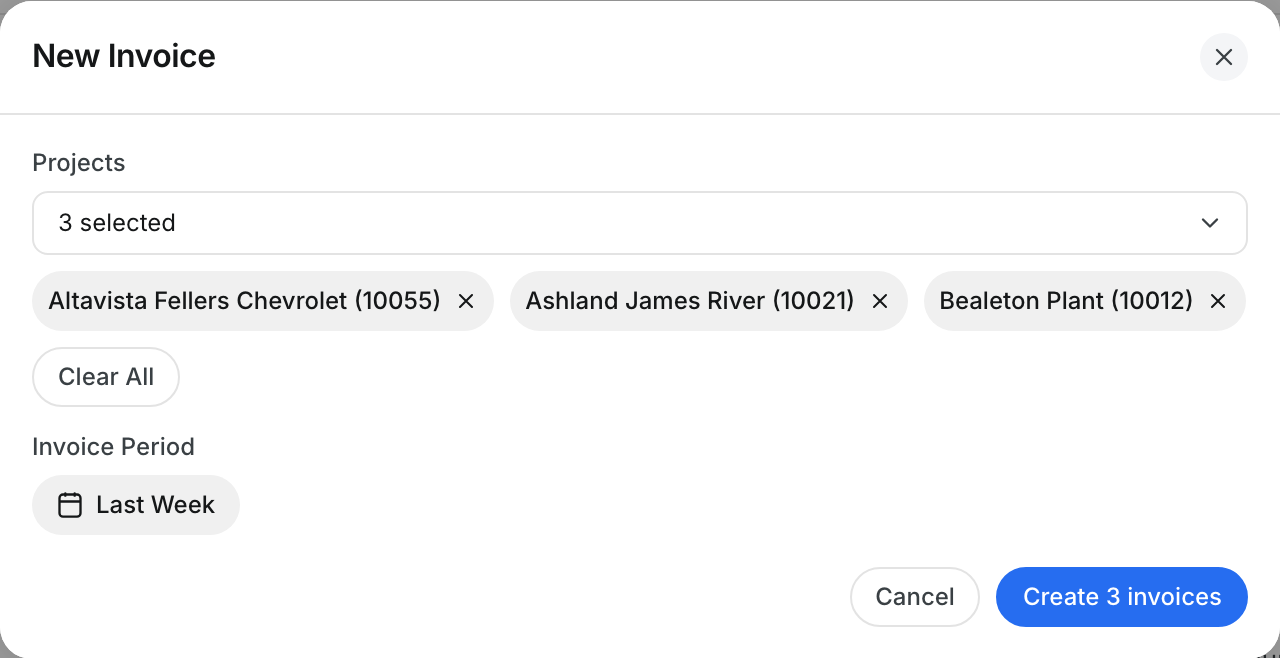
Billing many jobs every week no longer means repeating the same steps for each one. In New Invoice you can now select several projects at once, and CLUE creates one draft invoice per project for the period you choose. When the run is done you return to the invoice list, ready to review the drafts in your own order.
What’s New?
- Select any number of projects in the New Invoice dialog
- Create one draft invoice per project in a single run
- Return to the invoice list after creating, instead of opening the first new invoice
- The invoice period picker opens on the week it will invoice
Go to Finance → Rates → Invoices and click New Invoice.
Request a Demo Today to
See Our Latest Features in Action!
See Our Latest Features in Action!
Oops! Submission failed. Please try resubmitting the form.