New at CLUE: Capture the Full Workday in CLUE Dailies


.png)
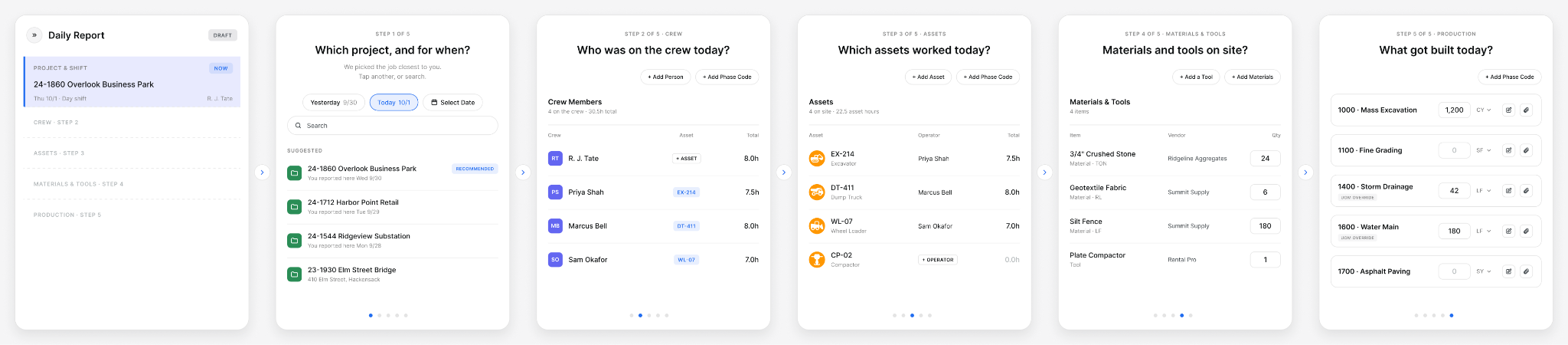
CLUE Dailies is how foremen close out the day. It records the crew who worked, the machines that ran, what got used, and how much got built, all coded to the job. Payroll, job cost, and equipment billing are built from this information. Most of it is already filled in, so foremen check the daily instead of typing it from scratch.

What's New?
- See every daily at a glance: The Dailies list shows one row per job, per crew, per day. A status column tracks the approval chain from draft through exported. Headcount and hours are rolled up so the office can read a day without opening it.
- Start with the job and crew already filled in: A new daily picks the job closest to the foreman and lists other jobs in the order they were last reported. You can copy yesterday's daily forward, which is useful on jobs running the same work all week. Crew members assigned to the job are added automatically.
- Review crew hours with costs filled in: Each crew member's clock-in and clock-out times appear next to their name. The only decision is which column each block of hours belongs in, including hours split across different jobs. Cost fills in from each person's pay class, and cost codes are added automatically. T&M and subcontractor details are included.
- Compare reported hours with telematics: For machines already reporting engine hours to CLUE, the assets view shows reported hours next to telematics hours. If an operator writes down nine hours and the engine reports five, you see both numbers side by side on the day it happened.
- Log materials, tools, and production: Charge materials and small tools to a code. Enter how much got built, such as linear feet or tons, against each code. This lets you look at hours against quantity, so you know whether the day was productive, not just what it cost.
- Review the full day on one page: The report brings the whole day together, including flagged T&M items, attestations, and planning for tomorrow. It also flags hours with no rate set, which are left out of the cost, and names the person.
How to use: Open Dailies and start a new daily, or copy yesterday's forward. Review the crew and assets, enter materials and production, then open the report to review the full day.
Request a Demo Today to See Our Latest Features in Action!
Oops! Submission failed. Please try resubmitting the form.


