Automatic Inventory Tracking: How CLUE Counts Your Parts
What is this?
Every part in CLUE is counted across four buckets: Reserved, On Order, In Transit, and On Hand. When a part moves from one status to another, CLUE adjusts the counts automatically. You never enter a number manually. The buckets tell you exactly where every part is right now and how many of each you have at each stage.
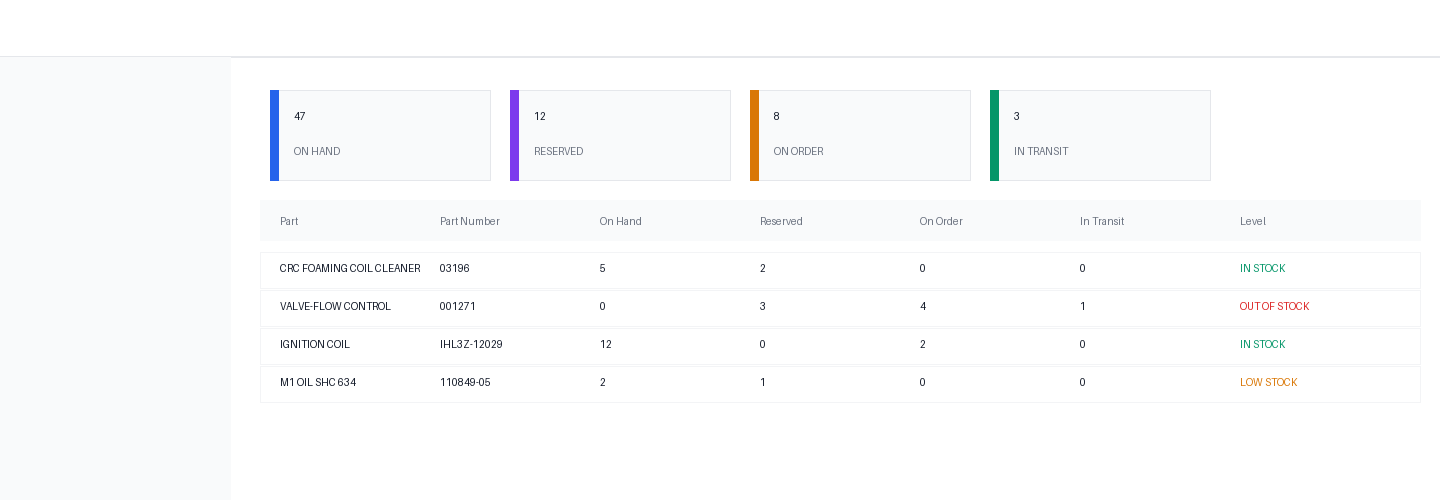
The four buckets
Each status a part can have maps to one bucket. The bucket determines which quantity column that part counts toward.
- Reserved — parts that have been requested for a work order but not yet ordered. Statuses: Requested, Ordering.
- On Order — parts that have been ordered from a vendor, waiting to arrive. Statuses: Ordered, Back Ordered, Scheduled.
- In Transit — parts that are shipped and on their way. Status: In Transit.
- On Hand — parts that are physically at your location and available to use. Statuses: Picked Up, Delivered, Received.
Used and Cancelled are drain statuses. They remove a part from whichever bucket it was in. There is no Used bucket — a used part is consumed and leaves the count entirely.
How the counts move
Every time a part status changes, CLUE looks up the movement rule for that transition and adjusts the relevant columns. Here is what happens at each step of the typical lifecycle:
Part requested
A new part is added to a work order with status Requested. Reserved goes up by the part quantity.
- Reserved +qty
Requested to Ordered
The part gets ordered from a vendor. It leaves the Reserved bucket and enters On Order.
- Reserved -qty
- On Order +qty
Ordered to Delivered
The part arrives. It leaves On Order and enters On Hand.
- On Order -qty
- On Hand +qty
Delivered to Used
A mechanic installs the part. It leaves On Hand. The part is consumed — no bucket gains.
- On Hand -qty
Cancellation (from any status)
A part is cancelled. CLUE removes it from whichever bucket it was in. Nothing else changes.
- Whichever bucket the part was in: -qty
Skipping steps
Parts do not have to go through every step. A Requested part can jump straight to Used. When that happens, CLUE applies two changes at once: it drains the source bucket and takes the part out of On Hand, even if the part was never physically on the shelf.
- Requested to Used: Reserved -qty and On Hand -qty
- Ordered to Used: On Order -qty
- In Transit to Used: In Transit -qty
Full transition reference
Every valid status change and the exact quantity columns it affects:
- New part (no status) to Requested: Reserved +qty
- New part directly to Ordered: On Order +qty
- New part directly to Delivered: On Hand +qty
- Requested to Ordered: Reserved -qty, On Order +qty
- Requested to In Transit: Reserved -qty, In Transit +qty
- Requested to Used: Reserved -qty, On Hand -qty
- Requested to Cancelled: Reserved -qty
- Ordered to In Transit: On Order -qty, In Transit +qty
- Ordered to Delivered: On Order -qty, On Hand +qty
- Ordered to Used: On Order -qty
- Ordered to Cancelled: On Order -qty
- In Transit to Delivered: In Transit -qty, On Hand +qty
- In Transit to Used: In Transit -qty
- In Transit to Cancelled: In Transit -qty
- Delivered to Used: On Hand -qty
- Delivered to Cancelled: On Hand -qty
- Ordered and Back Ordered switching: no change (both are On Order)
- Picked Up and Delivered switching: no change (both are On Hand)
Tips
- On Hand going negative means parts were marked Used without ever being marked Delivered. This is valid workflow but worth tracking as it shows parts bypassing the receive step.
- Reserved counts represent committed demand. If Reserved is higher than On Hand, you may need to reorder before those jobs reach the mechanic.
- Switching between Back Ordered and Ordered does not change any count. Both map to On Order. The change is status display only.
- Parts with track inventory turned off are excluded from all bucket calculations entirely.


