9 Things to Know About Fleet Software Integrations


Hi, I’m Maham Ali. I write about construction equipment management, helping teams use fleet data and maintenance intelligence to improve uptime, control costs, and run smoother jobsites.
Construction fleets rarely operate from a single system. Telematics may track equipment hours and location, maintenance software manages service activity, and ERP or accounting platforms handle costs, labor, and job data. The value of fleet software integrations is bringing those systems together so information can move between them without repeated manual entry.
But simply connecting two platforms does not automatically make an integration useful. What matters is what happens after the connection is established. Can engine hours update a preventive maintenance schedule? Can equipment issues move into work order workflows? Can labor and cost data reach the ERP with the correct project information? Strong integrations turn disconnected equipment data into coordinated workflows across telematics, maintenance, accounting, and operations.
Before evaluating a fleet platform, there are several practical integration factors worth understanding, especially for construction fleets managing mixed equipment, multiple data sources, and complex operational workflows.
Why are Fleet Software Integrations Important?
Most contractors already use multiple systems to manage their fleet, from telematics and GPS to ERP, accounting, and maintenance software. Without integrations, the same equipment data has to be entered into each system separately, increasing administrative work and creating opportunities for errors.
Fleet software integration connects the systems a contractor already uses, including telematics, GPS, ERP or CMMS, and parts or procurement, so equipment data moves automatically between them instead of being re-entered by hand. An engine-hour reading captured in the field can update a maintenance schedule, generate a work order, and reach the accounting system with the correct cost code, all without duplicate entry.
A telematics map, for example, shows where equipment is. An integration uses that same data to trigger maintenance, update records, or share information automatically, turning visibility into action.
Key Fleet Software Integration Considerations for Construction Equipment

Construction equipment integration carries a few problems that a standard vehicle fleet does not. Machines run on engine hours and duty cycles rather than mileage, so the service triggers themselves look different from anything built for trucks.
1. Telematics Data vs. Software Integration
A GPS dot on a map is not integration. Integration is what happens after the dot: engine hours sync to a preventive maintenance plan, a fault code opens a work order, and the work order carries a cost code that lands correctly in the ERP without anyone retyping it. The dot is data. The chain behind it is what makes the data worth anything.
In construction, that chain has to run across more providers than most software categories deal with. A mixed fleet might report through Samsara for GPS and tyre tire pressure, John Deere and CNH for OEM telematics, and HCSS for job costing, alongside a handful of smaller regional GPS providers still running on older equipment.
The value was never in any single feed. It is in the layer that sits on top and treats all of it as one fleet instead of a dozen separate logins.
2. Integration Requirements for Mixed and Untracked Fleets
Plenty of integration guides quietly assume every asset reports GPS, engine hours, and fault codes automatically. On a real construction fleet, that assumption falls apart fast, because mixed fleets are the norm rather than the exception.
One fleet manager committed to delivering utilization reporting to operations leadership for the year ahead, then realized close to half the fleet had no telematics installed at all. A tool that only reports on tracked assets simply cannot deliver that number, no matter how good its dashboards look. The fix is not more hardware on every machine. It is a system that treats tracked and untracked assets as two inputs feeding the same report, so utilization, cost, and status cover the whole fleet rather than just the wired half of it.
Mixed fleets also carry an identity problem that never shows up in a demo. Construction equipment built since 2001 carries a 17-character Product Identification Number under ISO 10261. Machines built earlier use 8-character formats, and attachments carry none. Each telematics feed also names the same asset in its own way: one by PIN, one by engine serial, one by a portal asset ID, and your ERP by a unit number someone assigned years ago. An integration that matches assets on a single serial-number field will eventually attach one machine's engine hours to another machine's maintenance schedule. Ask how the platform reconciles asset identity across feeds, and what it does when a match looks ambiguous.
3. The Four Categories of Fleet Software Integration
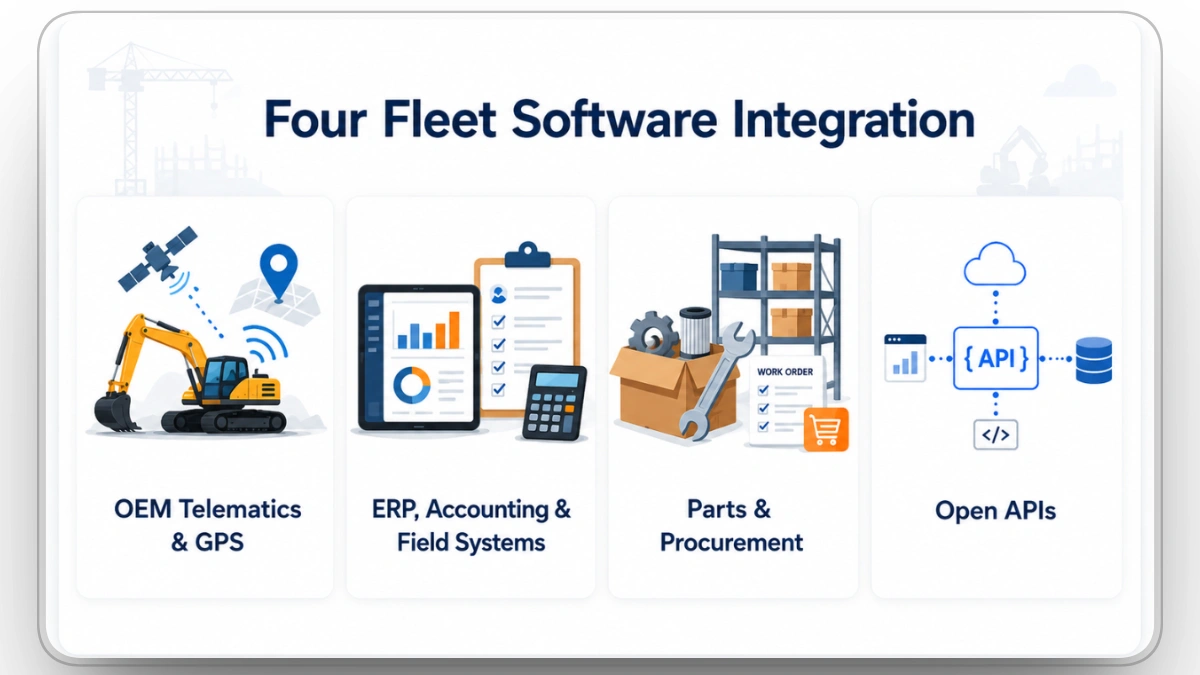
"Fleet integration" sounds like a single connector, but in practice it splits into four distinct categories. Understanding the difference helps explain why some platforms excel in one area while falling short in others.
OEM Telematics & GPS
OEM telematics and GPS integrations pull engine hours, location, fault codes, and diagnostics from the providers already installed on the equipment. The goal is to eliminate manual data entry by automatically syncing equipment data instead of relying on someone to re-key odometer or engine-hour readings.
ERP, Accounting & Field Systems
ERP and CMMS integrations synchronize projects, cost codes, labor, and timecards with the business systems contractors already rely on. The best integrations send information in the format each connected accounting, payroll, job-costing, or ERP system expects, reducing manual reconciliation and duplicate entry.
Parts & Procurement
Parts and procurement integrations connect work orders directly to inventory management and purchasing workflows, allowing mechanics to request the right parts without leaving the maintenance workflow.
Open APIs
Open APIs extend integrations beyond prebuilt connectors. Whether connecting BI platforms, procurement systems, custom applications, or other business software, APIs allow contractors to integrate additional systems without waiting for a dedicated vendor-built connector. Clue's external REST API supports equipment creation, location status, historical utilization, parts and inventory, and work order parts, while webhooks enable real-time event delivery to connected applications.
Most contractors rely on a combination of these integration types rather than a single connector. Clue supports 80+ integrations across OEM telematics, GPS, ERP, accounting, field systems, parts, and open APIs, allowing equipment data to move between systems while reducing manual data entry and disconnected workflows.
4. Real-Time Data Limitations in OEM Telematics
Telematics data gets sold as real-time, but in practice how current it is depends on the standard, the OEM, and the connection at the job site, not on the word printed on the sales deck.
ISO/TS 15143-3, which evolved from the AEMP telematics standard, defines a common communication schema for exchanging mobile equipment data between telematics provider servers and customer applications. This helps support mixed-fleet integrations across different equipment manufacturers. However, data availability, accuracy, and update frequency can still vary between OEMs and telematics providers.
Fault codes remain manufacturer-specific, so interpreting them still requires OEM-by-OEM mapping even after the data exchange format is standardized. Data refresh frequency depends on the OEM, telematics provider, device configuration, API implementation, and jobsite connectivity, so the timeliness of information can vary across fleets.
Some manufacturers split their own APIs the same way. Standard endpoints cover the basics, location, hours, idle time. Diagnostics, energy use, and richer fault context often sit behind a separate, sometimes paid, extended API. Planning an integration around a fully real-time, fully standardized assumption is planning around a sentence from a brochure, not a technical spec.
ISO/TS 15143-3, known in the industry as AEMP 2.0, sets how construction equipment telematics data moves from an OEM server to a customer application over a REST API in XML or JSON. ISO first published it in 2016 and revised it in 2020, building on the AEMP telematics standard released in 2010. It covers roughly 20 machine parameters. What the standard covers: asset identification, location, cumulative operating hours, fuel used, fuel and DEF levels, idle hours, engine running status, distance, engine condition data, load factor, and fault-code delivery. What it leaves to each OEM: fault-code meanings, update frequency, subscription requirements, authentication, and everything off the machine, from operators and timecards to cost codes, work orders, and parts.
Fault codes are the clearest limit. Caterpillar's own developer FAQ states that fault codes are defined by the OEM and might not be standardized, and that integrators need to obtain fault-code definitions from each manufacturer. For Caterpillar, those definitions live in a separate service application reached through the dealer. Multiply that across every brand in a mixed fleet and fault-code mapping becomes a project line item rather than a checkbox.
The subscription gate is usually commercial. Caterpillar's ISO API returns only assets on a paid VisionLink subscription, and machines on the base Connect tier do not appear in the feed at all. The minimum tier that returns API data is Connect Pro. When a machine goes missing from an OEM feed, the subscription level on that machine is almost always the cause, not the integration. A platform that reconciles the API's asset list against your owned-asset list catches this in a day. Clue covers the fix for Caterpillar assets missing from VisionLink or my.cat.com in a dedicated guide.
"Real-time" hides three separate delays. First, the device reports to the OEM's cloud on its own schedule. Second, the OEM refreshes its API cache; John Deere's ISO 15143-3 documentation advises integrators to expect hourly caching. Third, your application polls within a rate limit.
Published rate limits on the same ISO 15143-3 standard vary widely by provider. Trackunit's ISO Export AEMP endpoint allows one request per URL every 15 minutes. Samsara's AEMP equipment endpoint allows five requests per second. Caterpillar's ISO 15143-3 API allows 100 calls per second on snapshot endpoints and 30 per second on timeseries. Same standard, three implementations, three very different ceilings. Ask for the number in writing before you design a workflow around any provider's "real-time."
5. Automated Workflow Integration vs. Dashboard Reporting

The feature that gets demoed is usually a map or a chart. The feature that actually saves time is the one nobody watches: a failed inspection item automatically opening a work order, a preventive maintenance interval generating one with the right cost code already attached, a fault code that cannot be dismissed while it is still tied to an open repair.
That chain is what closes the classic failure mode in maintenance software, where a fault gets seen, a ticket gets opened somewhere, and the follow-through quietly stalls. One shop manager described the version that works as the operator finding a problem and a work order already existing before they even leave the cab. No phone call, no separate form, no chasing paperwork three days later. That is the real difference between visibility and integration. Visibility shows you the problem. Integration acts on it.
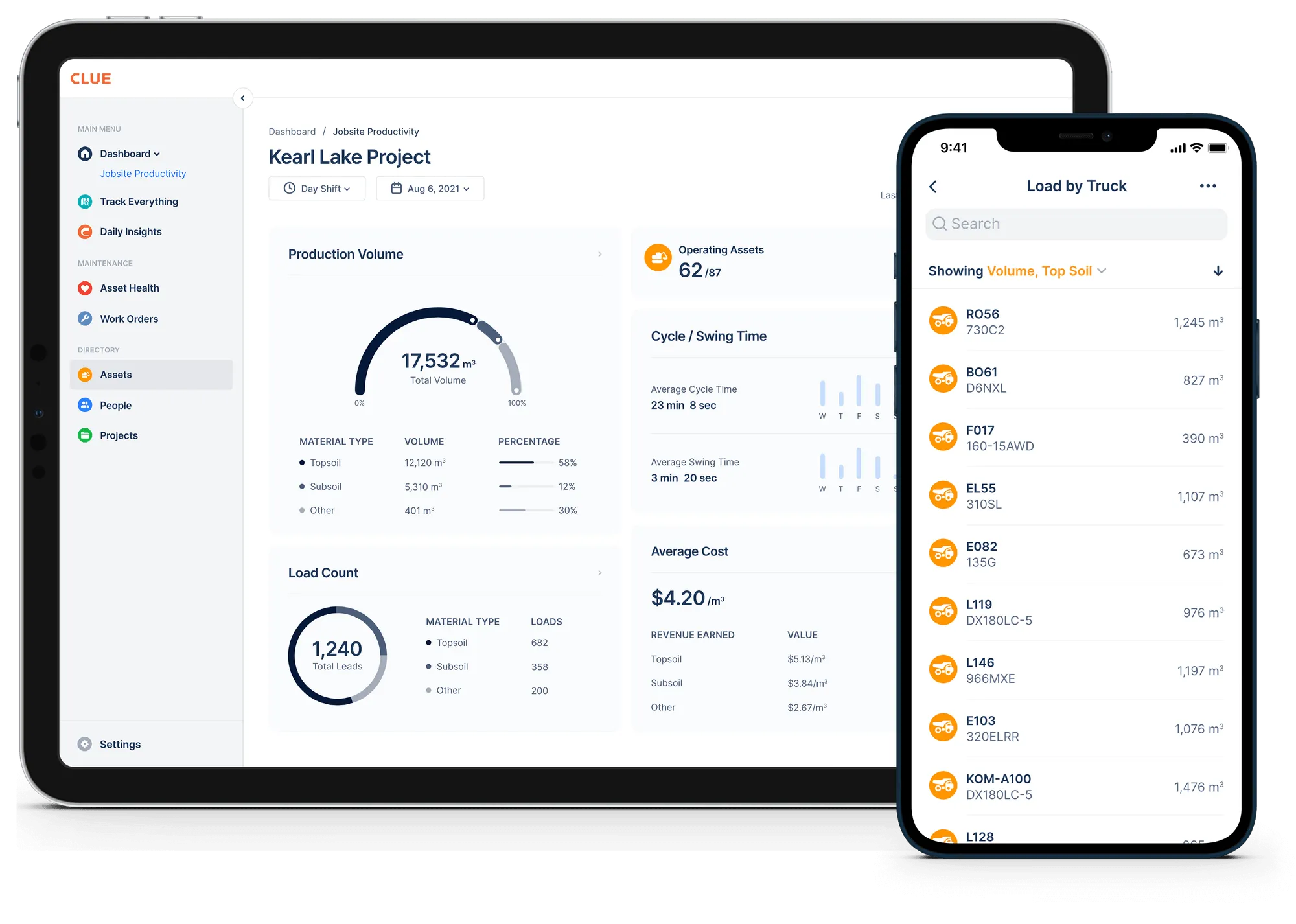
Rather than acting as another dashboard, Clue uses telematics data to automate inspections, preventive maintenance, and work order workflows, turning engine hours, fault codes, and location data into maintenance actions.
6. Security Architecture for Fleet Software Integration
Every integration adds a door into the system. Connected telematics devices, open API tokens, and ERP data pipes all expand what a security team has to account for. Security is no longer just about protecting one application. It has to extend across every connected system that exchanges fleet data.
Aftermarket tracking hardware can carry more than a receiver. Some devices ship with remote-command capabilities like fuel cutoff, alarm control, and immobilization. Those capabilities are exactly what an attacker wants. CISA's advisory ICSA-22-200-01 documented a widely deployed GPS tracker where hard-coded credentials let an attacker send SMS commands to the device and trigger its built-in cutoff on vehicles in the field. Roughly 1.5 million devices were in use at the time.
The question a security review should put in writing: what commands can the fleet platform or its tracking hardware send back to the machine, and can that path be disabled. For fleet management, read-only telemetry on the machine's network is the safer default, and the platform's role is to observe, not to actuate.
At an enterprise fleet, that plays out in a few concrete ways. Single sign-on lets field staff authenticate through the company's own identity provider instead of a separate password. SCIM provisioning creates and revokes accounts automatically as people join or leave, instead of relying on someone remembering to do it.
One precision point on SCIM: identity providers deactivate accounts by marking them inactive rather than deleting them, so the platform has to treat deactivation as immediate access revocation.
Role-based access keeps a driver from seeing what a shop manager sees. Self-service API tokens with granular scopes let IT issue and revoke access without opening a support ticket. An audit log on anything that changes a work order or a cost code means every change has a name and a timestamp attached. None of that is exciting to demo. All of it is what keeps an integration from becoming the reason a breach report gets written.
As integrations grow, Clue provides enterprise security controls including single sign-on (SSO), role-based permissions, configurable access controls, API token management, and audit logs to help organizations manage access and governance.
Enterprise IT reviews tend to ask for the same short list. Here is what a strong answer looks like for each item.
7. ERP Integration vs. ERP Replacement
The fastest way to kill adoption is to ask a mechanic or a foreman to learn a second system that does the same job as the one they already use. A stronger approach is ERP integration, where a fleet platform captures data once in the field and sends it to the ERP in the format that system already expects.
That looks different for every accounting system, and the difference matters. Projects sync from Vista automatically, and completed work orders push back with cost codes mapped to Vista's own batch numbering, because some ERPs require cost code tasks to be completed in a specific sequence to match how batches close. Timecards export in the exact format a Sage-via-Construct or Spectrum import pipeline needs, not a generic CSV someone reformats by hand afterward.
One fleet runs equipment time from the field through HeavyJob for job costing and into ADP for payroll. Eliminating double entry across that workflow was the single biggest driver of user adoption. Integration that respects the accounting, payroll, and field systems already in place gets used. Integration that tries to replace them usually does not.
Projects, cost codes, and timecards sync with Vista, Sage, Spectrum, and HeavyJob in the format each connected accounting, payroll, job-costing, or ERP system expects.
8. Enterprise Scalability in Fleet Software Integration
A ten equipment fleet and a thousand-asset enterprise contractor do not have the same integration problem, even when the underlying telematics feed looks identical. Scale introduces divisions, business units, joint ventures, and regional job sites, and the integration layer has to hold that structure without falling back to spreadsheets the moment it gets complicated.
In practice, that means the platform supports multi-level sub-organizations, so a division can have its own users, assets, and permissions without losing visibility at the parent level. It means bulk actions matter, resetting PM intervals or assigning plans across dozens of assets at once instead of one at a time, because clicking through each asset individually stops being realistic once the fleet crosses a few hundred units.
It means bulk geofence import from a KMZ or KML file when a company is standing up fifty job sites at once rather than drawing each one by hand. And for joint ventures specifically, it means the ability to bring an existing user from one organization into another without recreating their account from scratch.
Clue supports multi-level sub-organizations, bulk asset actions, cross-organization user management, and bulk geofence imports, making those enterprise structures practical to manage rather than administrative overhead.
9. Implementation as the Primary Determinant of Integration Success

Two platforms can have nearly identical integration checklists and produce completely different outcomes, because the gap is rarely the technology itself. It is whether the rollout matched how the business actually runs day to day.
One contractor's previous system was deployed by a team that did not understand the day-to-day differences between business units, and the result was software that technically ran but that almost nobody used. The features were all there. The adoption was not. The fix, in that case, was not a better API. It was an implementation that matched configuration to how each unit actually dispatched equipment, ran timecards, and closed work orders, which is a project management problem wearing a software costume.
Before signing off on any integration, the more useful question is not whether it connects to your systems. It is whether the person doing the data entry will still be using it after week three. Clue's implementation approach focuses on configuring workflows around existing maintenance and accounting processes instead of forcing teams into a standard template.
Wrapping Up
The best fleet software integrations do more than move data between systems. They reduce duplicate entry, connect telematics with maintenance and ERP workflows, and help teams turn equipment data into useful actions. When integrations are configured around real operational needs, contractors can improve data consistency, reduce administrative work, and respond to equipment issues more efficiently.
Rather than forcing contractors to stitch together disconnected systems, Clue's fleet management software brings fleet operations into one platform, connecting telematics, maintenance, ERP, inspections, and parts workflows. The goal is not simply to add more integrations, but to create a connected fleet environment where information is easier to access, workflows are easier to manage, and teams can make better decisions with less manual coordination.
Frequently Asked Questions
1. What is fleet software integration?
Fleet software integration connects telematics, GPS, ERP or CMMS, maintenance, and parts systems so equipment data can move between them automatically. This reduces duplicate entry and helps teams work from more consistent fleet information.
2. Do all fleet assets need GPS tracking?
No. Construction fleets often include both tracked and untracked equipment. A strong fleet software platform should combine data from both so utilization, cost, and equipment status reporting reflects the entire fleet.
3. What is ISO/TS 15143-3 in fleet telematics?
ISO/TS 15143-3, commonly associated with AEMP 2.0, standardizes how construction equipment data is exchanged between OEM systems and other applications. However, fault codes and some data definitions can still vary by manufacturer, so OEM-specific mapping may still be required. Caterpillar's own developer documentation goes further: it states fault codes are defined by the OEM and might not be standardized, so each brand needs its own mapping.
4. Why are fleet software integrations important?
Fleet software integrations help turn equipment data into useful workflows. For example, engine hours can support preventive maintenance scheduling, inspection issues can move into repair workflows, and operational data can be shared with ERP or accounting systems.
5. How do fleet integrations help large construction fleets?
Enterprise fleets need integrations that can support multiple business units, job sites, users, and large groups of assets. Features such as bulk actions, organizational structures, permissions, and scalable data connections make fleet operations easier to manage as the business grows.
6. Why do fleet software integrations fail?
Fleet software integrations often fail when implementation does not match the way teams actually work. Even a technically strong integration can deliver poor results if workflows, data mapping, user roles, and adoption are not configured correctly.
7. Should fleet software replace an ERP?
Usually not. Fleet software should complement the ERP by capturing operational equipment data and sending relevant information into the existing accounting, payroll, or job-costing system. This helps reduce duplicate work without forcing teams to replace systems they already rely on.
8. Does AEMP 2.0 include fault codes?
AEMP 2.0 standardizes how fault codes are delivered, not what they mean. Fault-code definitions stay proprietary to each manufacturer, so reading them still needs OEM-by-OEM mapping. Caterpillar's own developer documentation tells integrators to get fault-code definitions from each OEM.
9. Can fleet software send commands to my equipment?
Some telematics hardware can write to a machine's control network, and security agencies have documented real vulnerabilities in tracking devices, including remote fuel cutoff. For fleet management, the tracking device should stay read-only on the machine's network. Put that question in any security review.
10. How much does a custom integration cost to maintain?
Industry estimates put initial development at 30 to 40 percent of an integration's lifetime cost. The rest goes to maintenance, rework, and keeping up with API changes, often 25,000 to 70,000 dollars per integration per year in complex categories. That math is why prebuilt, vendor-maintained connectors usually win.
Transform Your Equipment Management