Reviewing Inspection Issues
Maintenance
Reading Time:
4 min read
Overview
Inspection Issues captures problems found during operator pre-trip inspections. These issues help identify equipment problems before they become major failures.
Inspection Issues Dashboard
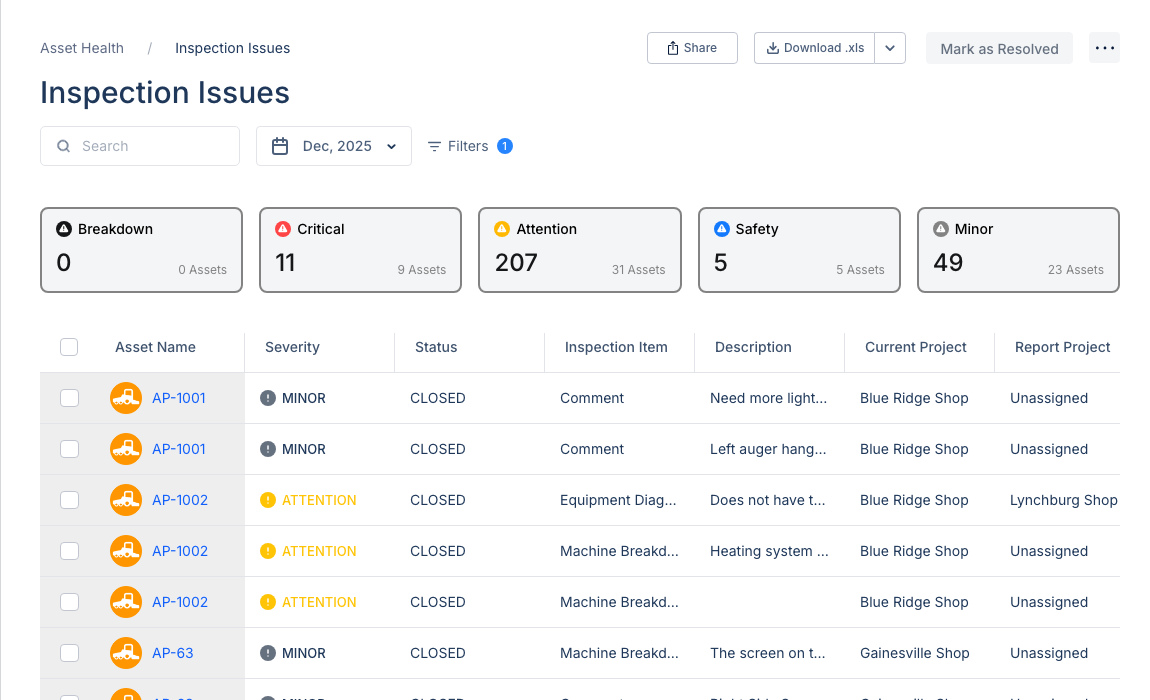
Navigate to Maintenance > Inspection Issues to view issues reported from field inspections.
Header Actions
- Search - Find issues by asset name or description
- Date Filter - Filter by month/date range
- Filters - Additional filtering options
- Share - Share the current view
- Download - Export to Excel (.xls)
- Mark as Resolved - Bulk resolve selected issues
Severity Summary Cards
Five cards show the breakdown of issues by severity:
- Breakdown - Equipment cannot operate
- Critical - Serious issue requiring immediate attention
- Attention - Issue needs to be addressed soon
- Safety - Safety-related concern
- Minor - Low priority maintenance item
Click any card to filter the table by that severity level.
Issues Table
The table shows:
- Asset Name - Equipment with the issue
- Severity - Issue severity level
- Status - Open or Closed
- Inspection Item - What was inspected
- Description - Details about the issue
- Current Project - Where the asset is assigned
- Report Project - Where issue was reported
Tips
- Review Critical and Breakdown issues daily
- Create work orders for items needing repair
- Use the Download button for compliance reports
- Filter by date to see recent inspections