How to Return Tools and Handle Partial Returns | CLUE Learning
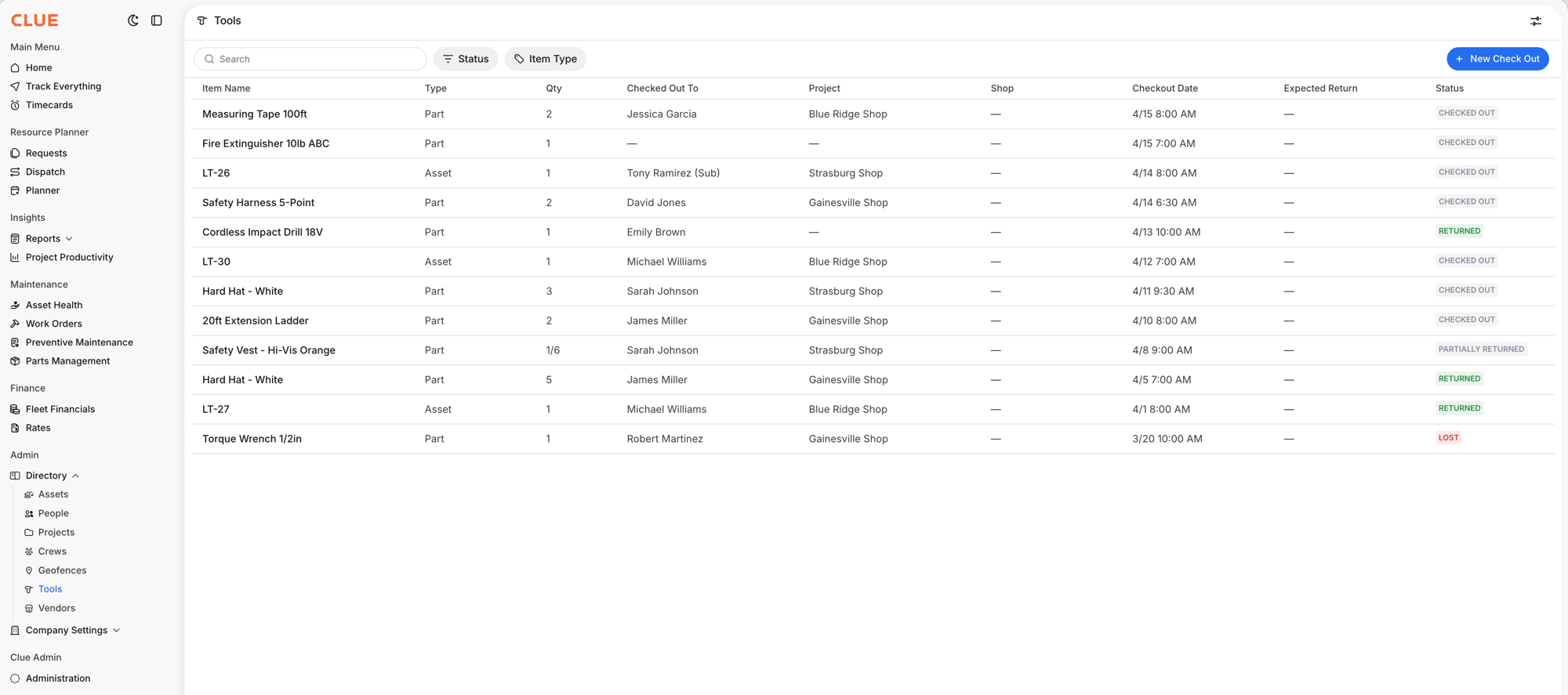
How to Return Tools and Handle Partial Returns is a feature in Clue's Tools module that lets you log the return of checked-out tools and equipment items. You can return a full batch in one action, return part of a quantity and leave the rest outstanding, or mark an item as lost when it is not coming back. Every action is logged with a timestamp and a full history is kept for every item.
The return process connects directly to Clue's inventory management tracking so that your available stock counts stay accurate as tools come back from the field. Returns, partial returns, and lost items all update the item's status and quantity automatically.
Who Is This For?
- Shop Managers process returns as tools and equipment come back from the field. They use the Tools module to confirm what has been returned, what is still out, and what has been marked lost, keeping inventory counts accurate at all times.
- Equipment Managers use return history to identify patterns in tool losses, track which projects or employees have outstanding items, and make informed decisions about tool purchasing and replacement.
- Mechanics and Field Teams return tools through the Tools module when jobs are complete. The return log serves as a record of what came back, protecting both the individual and the shop from disputes over missing items.
How to Return Tools?
Step 1: Find the checked-out item
Go to the Tools page and filter by CHECKED OUT status to see only items currently out in the field. This narrows the list to active check-outs and makes it easy to find the item being returned.
Step 2: Open the item detail panel
Click the row for the item being returned. The side panel opens showing all check-out details:
- Who has the item
- Which project it was checked out to
- When it went out
- Quantity checked out
- Any notes logged at check-out
Step 3: Click Return
Click the Return button in the detail panel. The return dialog opens showing the item summary and the quantity that was originally checked out.
Step 4: Complete a full or partial return
For a full return, confirm the return without changing the quantity. The item status changes to RETURNED and it drops off the checked-out list.
For a partial return, enter how many items are coming back. If 6 safety vests were checked out and 4 are being returned today, enter 4. The status changes to PARTIALLY RETURNED and the Qty column shows 4/6. The remaining 2 stay outstanding and can be returned in a separate transaction later.
Step 5: Mark an item as lost
If an item is not coming back, open its detail panel and change the status to LOST. This creates a permanent record of the loss, removes the item from the currently-out list, and updates inventory counts. Mark items lost promptly so your numbers stay accurate.
Key Behaviors and Limitations
- Full return changes the status to RETURNED. The item is removed from the checked-out list and inventory is updated to reflect it is back in stock.
- Partial return changes the status to PARTIALLY RETURNED. The Qty column shows the fraction returned, such as 4/6. The item remains on the checked-out list until the full quantity is accounted for.
- Multiple partial returns are supported. You can make several partial returns over time until the full quantity is returned. Each partial return is logged separately with its own timestamp.
- Lost status creates a permanent record. Marking an item lost removes it from the outstanding list but preserves the full check-out and return history. The record is never deleted.
- Every action is logged with a timestamp. Check-outs, returns, partial returns, and lost status changes are all recorded in the item history. This log is available for reference at any time.
Tips
- Log partial returns immediately rather than waiting. If 4 of 6 hard hats come back today, return the 4 now. Waiting creates confusion about what is actually still in the field versus what has informally come back.
- Mark lost items promptly. If a tool is gone, log it as lost as soon as that is confirmed. Waiting creates a gap between the real inventory count and what Clue shows, which compounds over time.
- Check the PARTIALLY RETURNED filter regularly. These are items where someone still owes you a quantity. Reviewing this list weekly makes it easier to follow up before the outstanding items are forgotten or lost.
- Use the return history when there is a dispute. If someone claims they returned a tool and the shop has no record of it, the return log shows the exact date, quantity, and who processed the return. This resolves disputes without relying on memory.