Viewing PM Status for Your Fleet
Preventive Maintenance
Reading Time:
4 min read
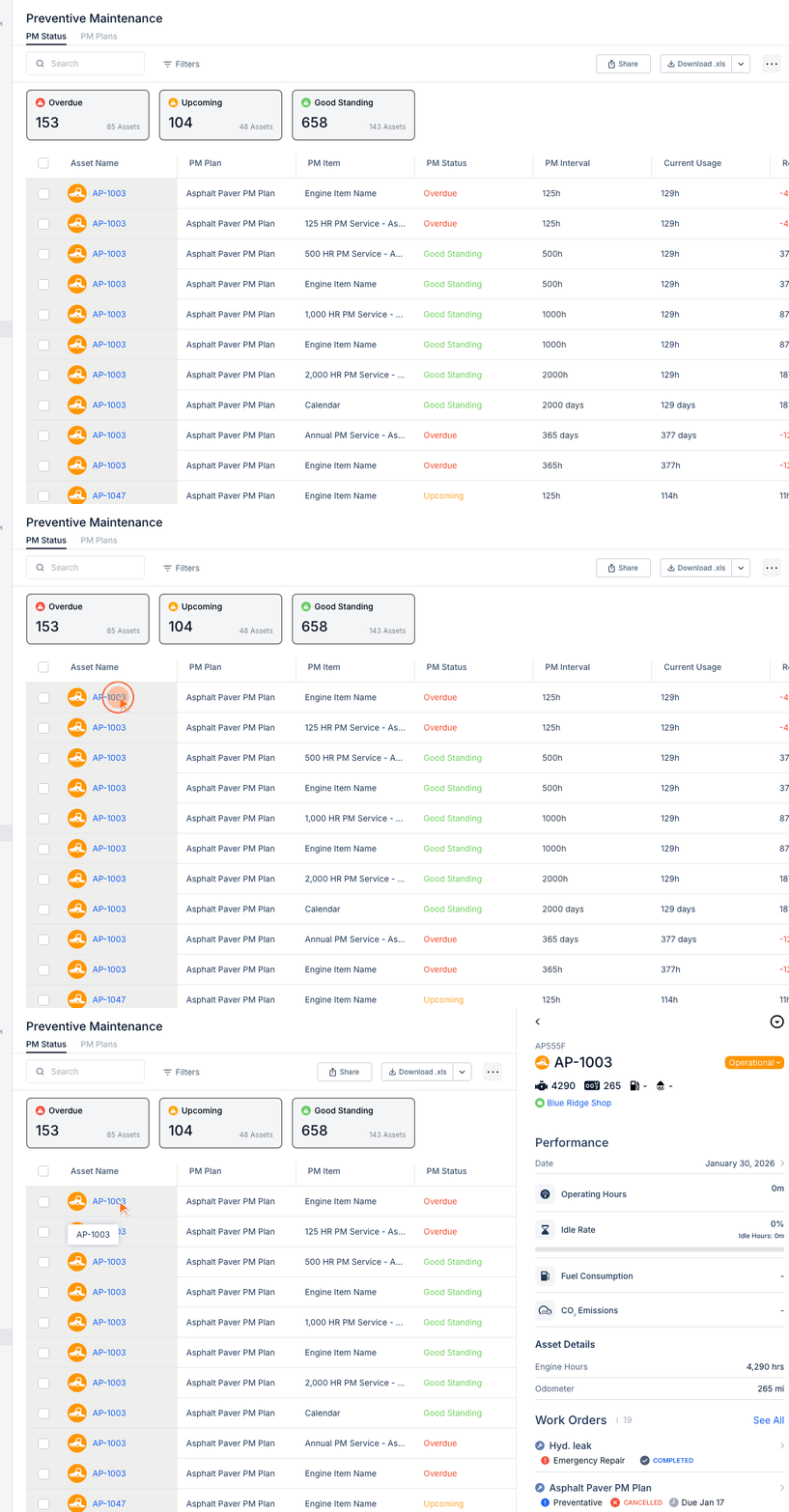
The PM Status view shows which equipment is due for service, helping you stay on top of preventive maintenance.
Accessing PM Status
- Navigate to Preventive Maintenance
- Click the PM Status tab
PM Status Columns
- Asset - Equipment name
- PM Plan - Service plan assigned
- PM Item - Specific service item
- Status - Good Standing, Upcoming, or Overdue
- Interval - Service frequency
- Current Usage - Current hours/miles/days
- Remaining - Until next service due
- WO Status - If work order exists
Status Indicators
- Good Standing (Green) - Not yet due, plenty of time
- Upcoming (Yellow) - Due soon, schedule service
- Overdue (Red) - Past due, service immediately
Creating Work Orders from PM
- Select PM items needing service
- Click Create Work Order
- PM details auto-populate
- Assign and schedule
Filtering PM Status
- Status - Show only Overdue or Upcoming
- Asset Type - Filter by equipment category
- PM Plan - Show specific service plans
Tips
- Review Overdue items daily
- Schedule Upcoming items proactively
- Use bulk actions for multiple items