Every piece of equipment your company operates carries a daily cost whether it's working on a project, sitting in the yard, or moving between sites. A Rate Book is where those costs are defined. It sets the owning and operating rates for each equipment class in your fleet, giving your organization a consistent, structured basis for charging equipment to projects.
Rate books have effective dates, which means you can build next year's rates in advance and have them activate automatically on January 1 without any manual intervention at year end.
Who Is This For?
- Equipment Managers use rate books to ensure that equipment is being charged to projects at accurate, up-to-date rates that reflect real ownership and operating costs.
- Finance Teams use rate books to maintain consistent cost allocation across all divisions and projects, and to support budget planning and client billing. This connects to CLUE's fleet management solution where accurate cost tracking across the fleet is essential.
- Division or Business Unit Leaders use division-specific rate books when different parts of the organization operate under different rate structures, such as a paving division with different daily rates than a trucking division.
How to Use It
1. View Your Rate Books
Go to Rates in the sidebar and click the Rate Book tab. All existing rate books are listed here with their name, version, status, active date range, and assigned business unit.

2. Create a New Rate Book
Click + New Rate Book. Set the name, version number, effective start and end dates, business unit scope (organization-wide or a specific division), and any relevant notes. The effective dates control when the book becomes active and when it expires.

3. Add Rates to the Book
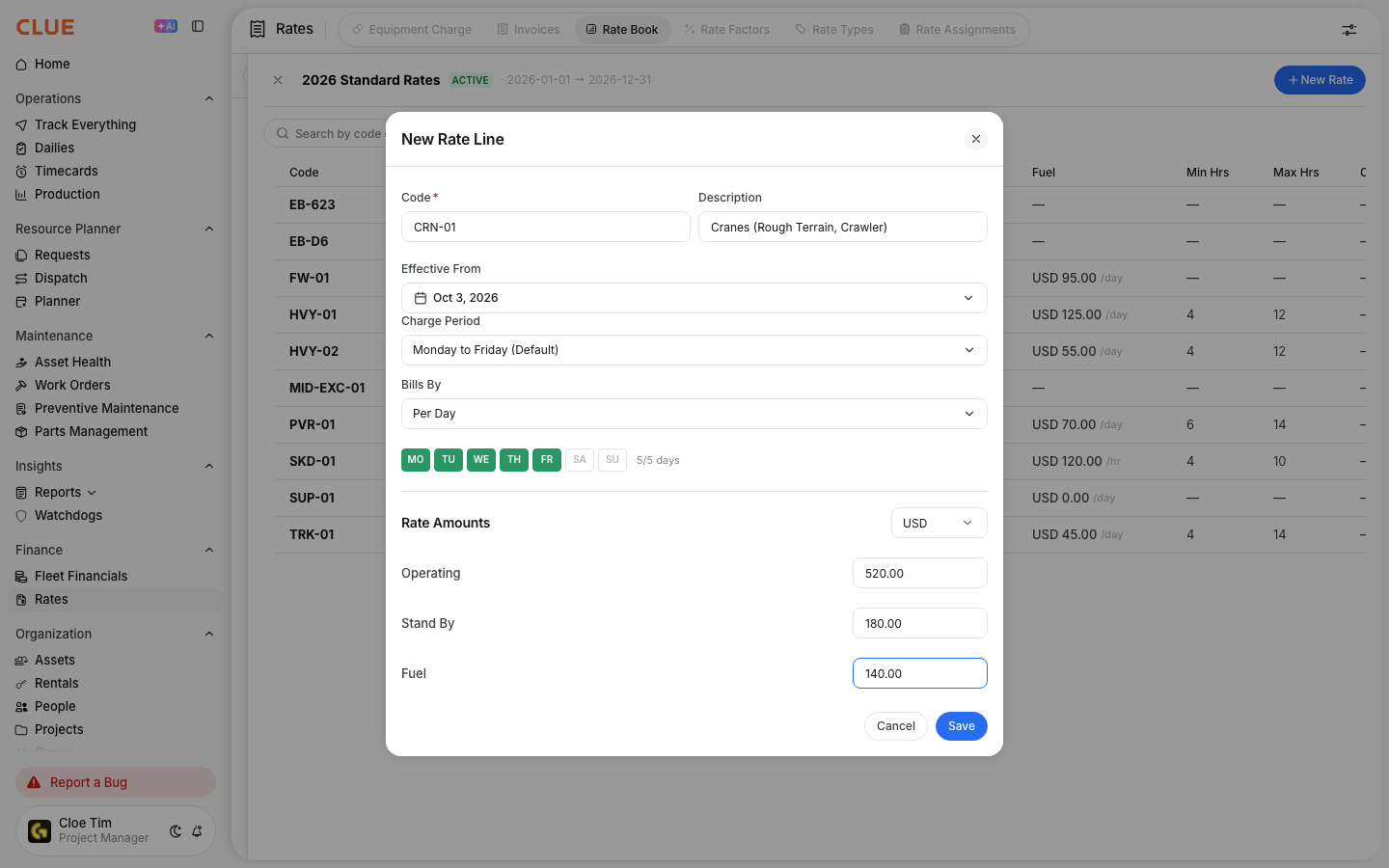
Open a rate book to view and manage its rates. Each rate entry includes a rate code such as HVY-01, a description, currency, owning cost per day, operating cost per day or hour, minimum and maximum billable hours, billing period, charge days, and status.

4. Create Individual Rates
Click + New Rate to add a new rate to the book. Fill in the rate code, description, owning and operating costs, billing period, and the days of the week on which the charge applies. For example, selecting Monday through Friday charges only on weekdays.
Key Behaviors and Limitations
- Works on the web app. Rate books are managed on the web app only.
- Rate statuses are Active or Inactive. Filter by status within a rate book to manage which rates are currently in use. Inactive rates remain in the book but are not applied to equipment charges.
- Business unit scope controls which divisions the book applies to. An org-wide book applies to all divisions. A division-scoped book such as a Paving Division rate book applies only to that specific unit, allowing different rate structures across the organization.
- Charge days control billing frequency. Select which days of the week to charge for each rate. A weekday-only rate charges Monday through Friday. Adjust this when equipment regularly operates on weekends. This connects directly to how charges appear on the equipment charge timeline.
- Min/max hours set billing boundaries. Setting a minimum means equipment charged less than the minimum still bills at the minimum rate. This protects against undercharging on short-use days.
Tips
- Create next year's rate book before December. Set the effective date to January 1 and it activates automatically. This eliminates the end-of-year scramble to update rates while operations are still running.
- Use rate codes that align with your accounting system. Codes like HVY-01, TRK-01, and PVR-01 are easier to trace back to Vista cost codes or your ERP when reconciling charges.
- Create separate rate books for divisions with different rate structures. If your paving division charges at different rates than your trucking division, a separate book for each division keeps cost allocation clean and avoids incorrect charges.
- Review rates annually against actual operating costs. Rates that were accurate two years ago may not reflect current fuel prices, maintenance costs, or depreciation. An annual review keeps your charges defensible and accurate.


