Construction Equipment Utilization Software for Smarter Fleet Decisions

Track utilization across every asset, including equipment with telematics and equipment without connected data. Clue helps construction fleets review utilization rate, idle time, meter readings, usage gaps, and target performance so teams can right-size the fleet with cleaner usage data.

reviews at capterra
Capterra
reviews at getapp
GetApp
reviews at getapp
G2
Free demo  ·  No credit card
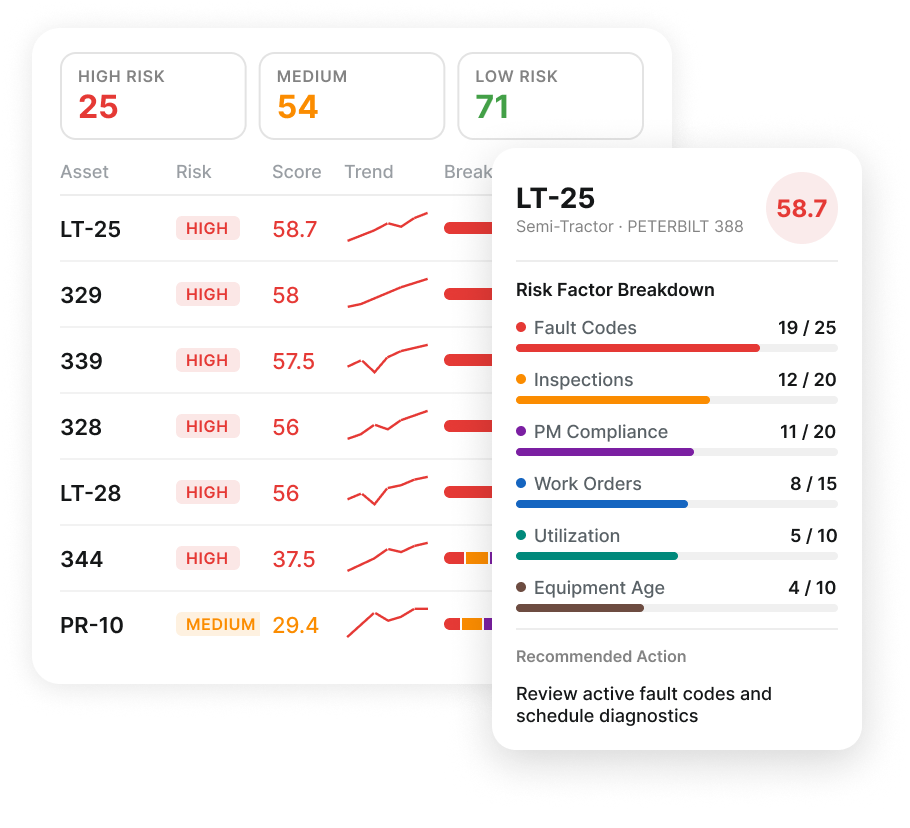
Maintenance risk dashboard showing assets with scores and detailed risk factors for asset LT-25 semi-tractor.
Mobile fleet operations dashboard

Track Utilization From Telematics and Manual Readings

A reliable equipment utilization report has to account for both connected and untracked equipment. Telematics hours, odometer readings, logged hours, and manual meter readings give fleet teams the usage record they need to compare assets without splitting the fleet.

Icon of a checkmark in a circle.
Telematics hours: Pull engine hours, odometer readings, and usage data from supported GPS and OEM telematics sources
Icon of a checkmark in a circle.
Manual readings by asset: Capture meter readings for equipment without connected telematics
Icon of a checkmark in a circle.
Mixed fleet support: Track connected and untracked assets in the same construction fleet utilization workflow
Icon of a checkmark in a circle.
Hours Reconciliation: Compare telematics hours against logged hours to identify usage gaps
"Clue bridges the gap between our field, operators, and other departments."
— Brent Scarbrough & Co
Mobile fleet operations dashboard

Review Utilization by Fleet, Project, Asset, and Target

Utilization reporting should show more than a total hour count. Fleet teams need asset-level, project-level, and target-based views to see which equipment is meeting plan, falling short, sitting idle, or worth closer review before the next planning cycle.

Icon of a checkmark in a circle.
Asset-level review: Review utilization by individual asset without losing the fleet-level view
Icon of a checkmark in a circle.
Project-level view: Compare utilization across jobsites to see where equipment is working, sitting, or underused
Icon of a checkmark in a circle.
Custom date ranges: Filter utilization by day, week, month, or selected reporting period
Icon of a checkmark in a circle.
Utilization targets: Set expected usage targets by asset and review equipment falling below plan
Mobile fleet operations dashboard

Track Equipment Idle Time and Working Hours

Idle time is one of the clearest signs that equipment utilization is drifting from plan. Fleet teams need to compare idle activity, working hours, fuel use, and utilization targets to understand which assets are burning costs without producing enough value.

Icon of a checkmark in a circle.
Idle time tracking: Review idle activity across equipment and fleet groups
Icon of a checkmark in a circle.
Idle vs. working hours: Compare idle time with active operating hours to identify wasted runtime
Icon of a checkmark in a circle.
Fuel usage: Review fuel rate, volume, and cost alongside utilization and idle activity where supported
Icon of a checkmark in a circle.
Utilization targets: Compare idle-heavy assets against expected usage targets
Icon of a checkmark in a circle.
Idle follow-up: Use idle signals to support reassignment, rental return, service review, or dispatch follow-up
"Clue bridges the gap between our field, operators, and other departments."
— Brent Scarbrough & Co