Setting Up Rate Books
What is this?
A rate book defines how much your company charges for equipment usage. Each book contains rates for different equipment classes: heavy equipment, trucks, paving machines, skid steers. The rates break down into owning cost (the daily cost of having the machine) and operating cost (the cost when it is actually running).
Rate books have effective dates, so you can set up next year's rates now and they activate automatically on January 1.
How to use it
Step 1: View your rate books
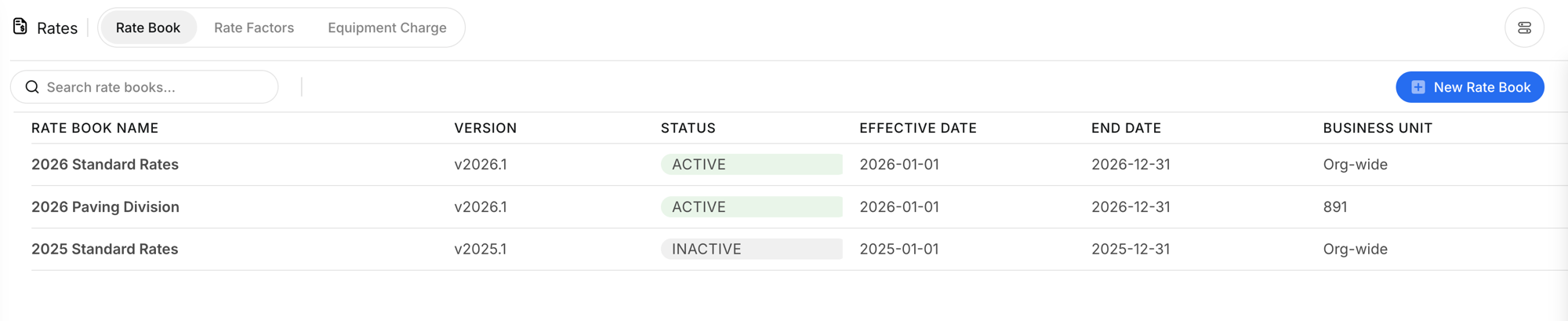
Go to Rates in the sidebar and click the Rate Book tab. You will see all rate books with their name, version, status, date range, and business unit.
Step 2: Create a new rate book
Click + New Rate Book. Set the name, version, effective dates, business unit (org-wide or specific division), and notes.

Step 3: Add rates to the book
Open a rate book to see its rates. Each rate has a code (like HVY-01), description, currency, owning cost per day, operating cost per day or hour, minimum/maximum hours, billing period, charge days, and status.

Step 4: Create individual rates
Click + New Rate to add a rate. Fill in the code, description, owning and operating costs, period, and which days to charge on.

The full details
- Works on: Web app
- Location: Finance > Rates > Rate Book
- Rate statuses: Active and Inactive. Filter by status to manage your book.
- Business units: Org-wide applies to all divisions. Or scope a book to a specific division (like "2026 Paving Division").
- Charge days: Select which days of the week to charge (e.g., MO,TU,WE,TH,FR for weekdays only).
- Min/Max hours: Set minimum and maximum billable hours per period. Equipment charged less than the minimum still pays the minimum.
Tips
- Create next year's rate book early. Set the effective date to January 1 and it activates automatically. No scramble in December.
- Use rate codes that match your accounting system. HVY-01, TRK-01, PVR-01 are easy to trace back to Vista cost codes.
- Separate books for different divisions if they have different rate structures. Paving might charge differently than trucking.

